
Continuation head and continuation note
Task
On a multi-page article list the readers should see that the table continues and where it ends: the first page carries the normal head, the following pages a head with the addition “Continued”. At the end of every page except the last one there is a note “continued on next page”; only the last page shows the closing foot.
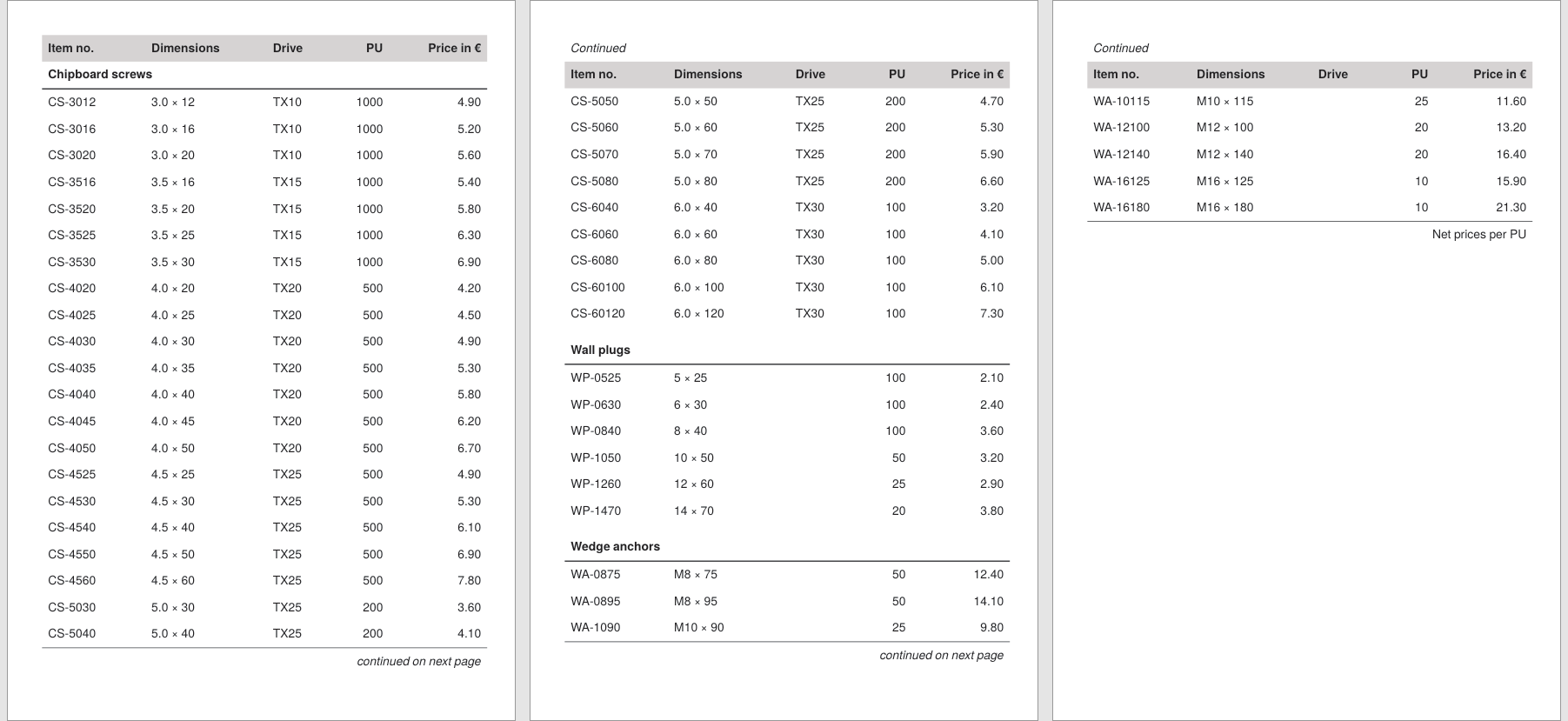
Decision
The recipe Simple table with automatic breaking is enough as long as head and foot may look the same on all pages. If they should differ per page, the automatic mechanism still stays in place: <Tablehead> and <Tablefoot> can be declared several times, and the attribute page determines which variant appears on which page. The Publisher picks the right one at each break by itself.
One limit is worth knowing before you start: the contents of head and foot are evaluated when the table is built, not at each page break. A real page number (“continued on page 17”) can therefore not be output here; see Limits.
Solution
The data is the unchanged Confixa article list from the first recipe.
Step 1: two table heads
The head for the first page gets page="first", the one for the following pages page="all". As soon as a first variant is declared, all applies to all pages except the first; the order of declaration does not matter.
<Tablehead page="first">
  <Tr background-color="lightgray">
    <Td><Paragraph><B><Value>Item no.</Value></B></Paragraph></Td>
    <!-- the other column heads as before -->
  </Tr>
</Tablehead>
<Tablehead page="all">
  <Tr>
    <Td colspan="5"><Paragraph><I><Value>Continued</Value></I></Paragraph></Td>
  </Tr>
  <Tr background-color="lightgray">
    <Td><Paragraph><B><Value>Item no.</Value></B></Paragraph></Td>
    <!-- the other column heads as before -->
  </Tr>
</Tablehead>
The continuation head may have more than one row: here an additional row with the italic “Continued” sits above the column heads.
Step 2: two table feet
For the feet the counterpart of first is, fittingly, last: if a last variant is declared, the all variant appears on all pages except the last one. This puts the note “continued on next page” exactly on the pages where the table goes on:
<Tablefoot page="all">
  <Tablerule rulewidth="0.5pt"/>
  <Tr>
    <Td colspan="5" align="right">
      <Paragraph><I><Value>continued on next page</Value></I></Paragraph>
    </Td>
  </Tr>
</Tablefoot>
<Tablefoot page="last">
  <Tablerule rulewidth="0.5pt"/>
  <Tr>
    <Td colspan="5" align="right">
      <Paragraph><Value>Net prices per PU</Value></Paragraph>
    </Td>
  </Tr>
</Tablefoot>
If the last page should not show any foot at all, simply declare the variant empty: <Tablefoot page="last"/>.
Complete example
The runnable project is also available in the examples repository; the data file is the same as in the first recipe. The A5 format and the generous padding only serve to produce three pages for the illustration.
<Layout xmlns="urn:speedata.de:2009/publisher/en"
  xmlns:sd="urn:speedata:2009/publisher/functions/en">

  <Pageformat width="148mm" height="210mm"/>

  <Record element="data">
    <PlaceObject>
      <Table stretch="max" padding="5pt">
        <Tablehead page="first">
          <Tr background-color="lightgray">
            <Td><Paragraph><B><Value>Item no.</Value></B></Paragraph></Td>
            <Td><Paragraph><B><Value>Dimensions</Value></B></Paragraph></Td>
            <Td><Paragraph><B><Value>Drive</Value></B></Paragraph></Td>
            <Td align="right"><Paragraph><B><Value>PU</Value></B></Paragraph></Td>
            <Td align="right"><Paragraph><B><Value>Price in €</Value></B></Paragraph></Td>
          </Tr>
        </Tablehead>
        <Tablehead page="all">
          <Tr>
            <Td colspan="5"><Paragraph><I><Value>Continued</Value></I></Paragraph></Td>
          </Tr>
          <Tr background-color="lightgray">
            <Td><Paragraph><B><Value>Item no.</Value></B></Paragraph></Td>
            <Td><Paragraph><B><Value>Dimensions</Value></B></Paragraph></Td>
            <Td><Paragraph><B><Value>Drive</Value></B></Paragraph></Td>
            <Td align="right"><Paragraph><B><Value>PU</Value></B></Paragraph></Td>
            <Td align="right"><Paragraph><B><Value>Price in €</Value></B></Paragraph></Td>
          </Tr>
        </Tablehead>
        <Tablefoot page="all">
          <Tablerule rulewidth="0.5pt"/>
          <Tr>
            <Td colspan="5" align="right">
              <Paragraph><I><Value>continued on next page</Value></I></Paragraph>
            </Td>
          </Tr>
        </Tablefoot>
        <Tablefoot page="last">
          <Tablerule rulewidth="0.5pt"/>
          <Tr>
            <Td colspan="5" align="right">
              <Paragraph><Value>Net prices per PU</Value></Paragraph>
            </Td>
          </Tr>
        </Tablefoot>
        <ForAll select="group">
          <Tr top-distance="8pt" break-below="no">
            <Td colspan="5" border-bottom="1pt">
              <Paragraph><B><Value select="@name"/></B></Paragraph>
            </Td>
          </Tr>
          <ForAll select="article">
            <Tr>
              <Td><Paragraph><Value select="@number"/></Paragraph></Td>
              <Td><Paragraph><Value select="@dim"/></Paragraph></Td>
              <Td><Paragraph><Value select="@drive"/></Paragraph></Td>
              <Td align="right"><Paragraph><Value select="@pu"/></Paragraph></Td>
              <Td align="right"><Paragraph><Value select="@price"/></Paragraph></Td>
            </Tr>
          </ForAll>
        </ForAll>
      </Table>
    </PlaceObject>
  </Record>
</Layout>
Limits
- No real page numbers in the note. The contents of
<Tablehead>and<Tablefoot>are evaluated once when the table is built, not at every page break;sd:current-page()therefore returns the same number in every foot. If you need “continued on page 17”, you have to portion the table yourself and set the feet per portion; this is shown in the recipe Breaking complex tables manually. - Dynamic content in head or foot (such as subtotals or a running sum) is possible with the mechanism of the
dataattribute on<Tr>plus the variable$_last_tr_data, see Headers and footers with running sum. - Repeating section headings: If the current group heading should reappear after the break, mark its row with
sethead="yes", see Headers and footers (dynamic). - Reference:
<Tablehead>and<Tablefoot>.