
Basic structure of a data sheet
Task
A reusable page scaffold for data sheets and price lists: every page carries the company name, the document title and a rule at the top, and a rule with an address line and the page number at the bottom, all with exact distances. In between lies the type area into which the content flows; the content here is the article list from the first table recipe.
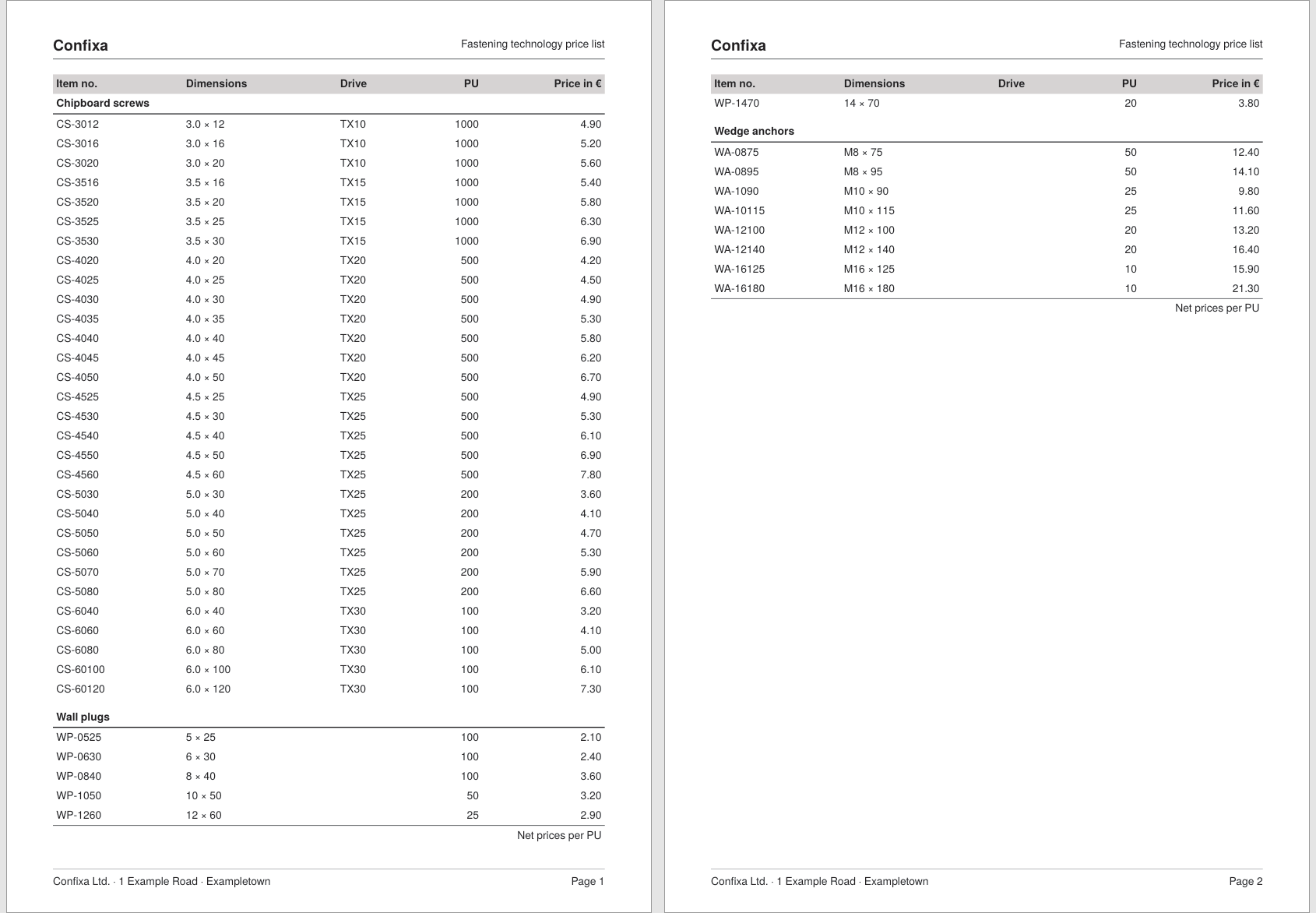
Decision
Three questions determine the structure of the scaffold:
- Where are head and foot defined? In the page type (
<Pagetype>), not in the data processing:<AtPageCreation>runs when the page is created (good for the head),<AtPageShipout>when the finished page is written to the PDF file (good for the foot, because heresd:current-page()is correct for every page). This way every page gets its scaffold automatically, no matter how many pages the content produces. - Grid or millimeters?
<PlaceObject>understands both forrowandcolumn: a number means a grid cell, a length means the distance from the edge of the sheet. Rule of thumb: what belongs to the page design (head, foot, rules) is placed absolutely with millimeter precision; what follows the content (the table) uses the grid. A finely tuned grid (here 3 mm) keeps the grid positions close to the design measurements as well. - How does the content stay out of head and foot? The type area is defined as a placement area. Content is output with
area="text"and can then never run into the head and foot zones.
Solution
Step 1: a fine grid and the page type
<SetGrid height="3mm" width="3mm"/>

<Pagetype name="datasheet" test="true()">
  <Margin left="15mm" right="15mm" top="15mm" bottom="15mm"/>
  ...
</Pagetype>
The condition test="true()" selects this page type for all pages. The margins of 15 mm and the 3 mm grid result in exactly 60 columns and 89 rows; uneven ratios between type area and grid size lead to clipped cells at the edge.
Step 2: the type area as a placement area
<PositioningArea name="text">
  <PositioningFrame width="{sd:number-of-columns()}"
    height="{sd:number-of-rows() - 4}" row="4" column="1"/>
</PositioningArea>
The area text starts in grid row 4 (below the head zone) and ends four rows before the bottom edge, leaving room for the foot. The size is expressed relatively via sd:number-of-rows()/sd:number-of-columns() and thus adapts when margins or grid are changed.
Step 3: the head with exact distances
<AtPageCreation>
  <PlaceObject column="15mm" row="12mm" allocate="no">
    <Textblock width="60">
      <Paragraph fontfamily="head"><Value>Confixa</Value></Paragraph>
    </Textblock>
  </PlaceObject>
  <PlaceObject column="15mm" row="12mm" allocate="no">
    <Textblock width="60" textformat="right">
      <Paragraph><Value>Fastening technology price list</Value></Paragraph>
    </Textblock>
  </PlaceObject>
  <PlaceObject column="15mm" row="19mm" allocate="no">
    <Rule direction="horizontal" length="180mm" rulewidth="0.5pt"/>
  </PlaceObject>
</AtPageCreation>
The lengths at row and column measure from the top and left edge of the sheet: the head starts exactly 12 mm from the top, the rule sits at 19 mm. allocate="no" makes sure these outputs do not occupy grid cells. Company name and document title sit at the same height; the title is pushed to the right margin via the predefined text format right (the <Textblock> is 60 grid cells wide for this, that is 180 mm).
Step 4: the foot with the page number
<AtPageShipout>
  <PlaceObject column="15mm" row="283mm" allocate="no">
    <Rule direction="horizontal" length="180mm" rulewidth="0.25pt"/>
  </PlaceObject>
  <PlaceObject column="15mm" row="285mm" allocate="no">
    <Textblock width="60">
      <Paragraph><Value>Confixa Ltd. · 1 Example Road · Exampletown</Value></Paragraph>
    </Textblock>
  </PlaceObject>
  <PlaceObject column="15mm" row="285mm" allocate="no">
    <Textblock width="60" textformat="right">
      <Paragraph>
        <Value>Page </Value>
        <Value select="sd:current-page()"/>
      </Paragraph>
    </Textblock>
  </PlaceObject>
</AtPageShipout>
Because <AtPageShipout> runs only when the page is written out, sd:current-page() returns the right number on every page. This is the counterpart to the limit from the recipe Continuation head: table heads and feet are evaluated when the table is built, page heads and feet per page.
Step 5: content into the type area
<Record element="data">
  <PlaceObject area="text">
    <Table stretch="max" padding="3pt">
      <!-- table as in the recipe "Simple table with automatic breaking" -->
    </Table>
  </PlaceObject>
</Record>
With area="text" the table lands in the type area: it uses its width, breaks at its lower edge, and every new page automatically gets head and foot from the page type. The scaffold and the table recipes thus interlock without further adjustment.
Complete example
The runnable project is also available in the examples repository; the data file is the Confixa article list from the first recipe.
<Layout xmlns="urn:speedata.de:2009/publisher/en"
  xmlns:sd="urn:speedata:2009/publisher/functions/en">

  <SetGrid height="3mm" width="3mm"/>

  <Pagetype name="datasheet" test="true()">
    <Margin left="15mm" right="15mm" top="15mm" bottom="15mm"/>

    <PositioningArea name="text">
      <PositioningFrame width="{sd:number-of-columns()}"
        height="{sd:number-of-rows() - 4}" row="4" column="1"/>
    </PositioningArea>

    <AtPageCreation>
      <PlaceObject column="15mm" row="12mm" allocate="no">
        <Textblock width="60">
          <Paragraph fontfamily="head"><Value>Confixa</Value></Paragraph>
        </Textblock>
      </PlaceObject>
      <PlaceObject column="15mm" row="12mm" allocate="no">
        <Textblock width="60" textformat="right">
          <Paragraph><Value>Fastening technology price list</Value></Paragraph>
        </Textblock>
      </PlaceObject>
      <PlaceObject column="15mm" row="19mm" allocate="no">
        <Rule direction="horizontal" length="180mm" rulewidth="0.5pt"/>
      </PlaceObject>
    </AtPageCreation>

    <AtPageShipout>
      <PlaceObject column="15mm" row="283mm" allocate="no">
        <Rule direction="horizontal" length="180mm" rulewidth="0.25pt"/>
      </PlaceObject>
      <PlaceObject column="15mm" row="285mm" allocate="no">
        <Textblock width="60">
          <Paragraph><Value>Confixa Ltd. · 1 Example Road · Exampletown</Value></Paragraph>
        </Textblock>
      </PlaceObject>
      <PlaceObject column="15mm" row="285mm" allocate="no">
        <Textblock width="60" textformat="right">
          <Paragraph>
            <Value>Page </Value>
            <Value select="sd:current-page()"/>
          </Paragraph>
        </Textblock>
      </PlaceObject>
    </AtPageShipout>
  </Pagetype>

  <DefineFontfamily name="head" fontsize="14" leading="16">
    <Regular fontface="sans-bold"/>
  </DefineFontfamily>

  <Record element="data">
    <PlaceObject area="text">
      <Table stretch="max" padding="3pt">
        <Tablehead>
          <Tr background-color="lightgray">
            <Td><Paragraph><B><Value>Item no.</Value></B></Paragraph></Td>
            <Td><Paragraph><B><Value>Dimensions</Value></B></Paragraph></Td>
            <Td><Paragraph><B><Value>Drive</Value></B></Paragraph></Td>
            <Td align="right"><Paragraph><B><Value>PU</Value></B></Paragraph></Td>
            <Td align="right"><Paragraph><B><Value>Price in €</Value></B></Paragraph></Td>
          </Tr>
        </Tablehead>
        <Tablefoot>
          <Tablerule rulewidth="0.5pt"/>
          <Tr>
            <Td colspan="5" align="right">
              <Paragraph><Value>Net prices per PU</Value></Paragraph>
            </Td>
          </Tr>
        </Tablefoot>
        <ForAll select="group">
          <Tr top-distance="8pt" break-below="no">
            <Td colspan="5" border-bottom="1pt">
              <Paragraph><B><Value select="@name"/></B></Paragraph>
            </Td>
          </Tr>
          <ForAll select="article">
            <Tr>
              <Td><Paragraph><Value select="@number"/></Paragraph></Td>
              <Td><Paragraph><Value select="@dim"/></Paragraph></Td>
              <Td><Paragraph><Value select="@drive"/></Paragraph></Td>
              <Td align="right"><Paragraph><Value select="@pu"/></Paragraph></Td>
              <Td align="right"><Paragraph><Value select="@price"/></Paragraph></Td>
            </Tr>
          </ForAll>
        </ForAll>
      </Table>
    </PlaceObject>
  </Record>
</Layout>
Limits
- Left and right pages: If margins or the position of the page number should alternate between left and right pages, define several page types with conditions like
sd:even(sd:current-page()); the selection logic is described in the chapter Page types. - Multi-column type area: An area may consist of several
<PositioningFrame>elements; text output via<Output>then flows from frame to frame, see Placement areas. - Prepress: Bleed and crop marks for the scaffold are covered in the chapter Prepress, thumb index marks at the page edge in the chapter Thumb index.
- Reference:
<Pagetype>,<AtPageCreation>,<AtPageShipout>,<PositioningFrame>.