
Keyword index
Task
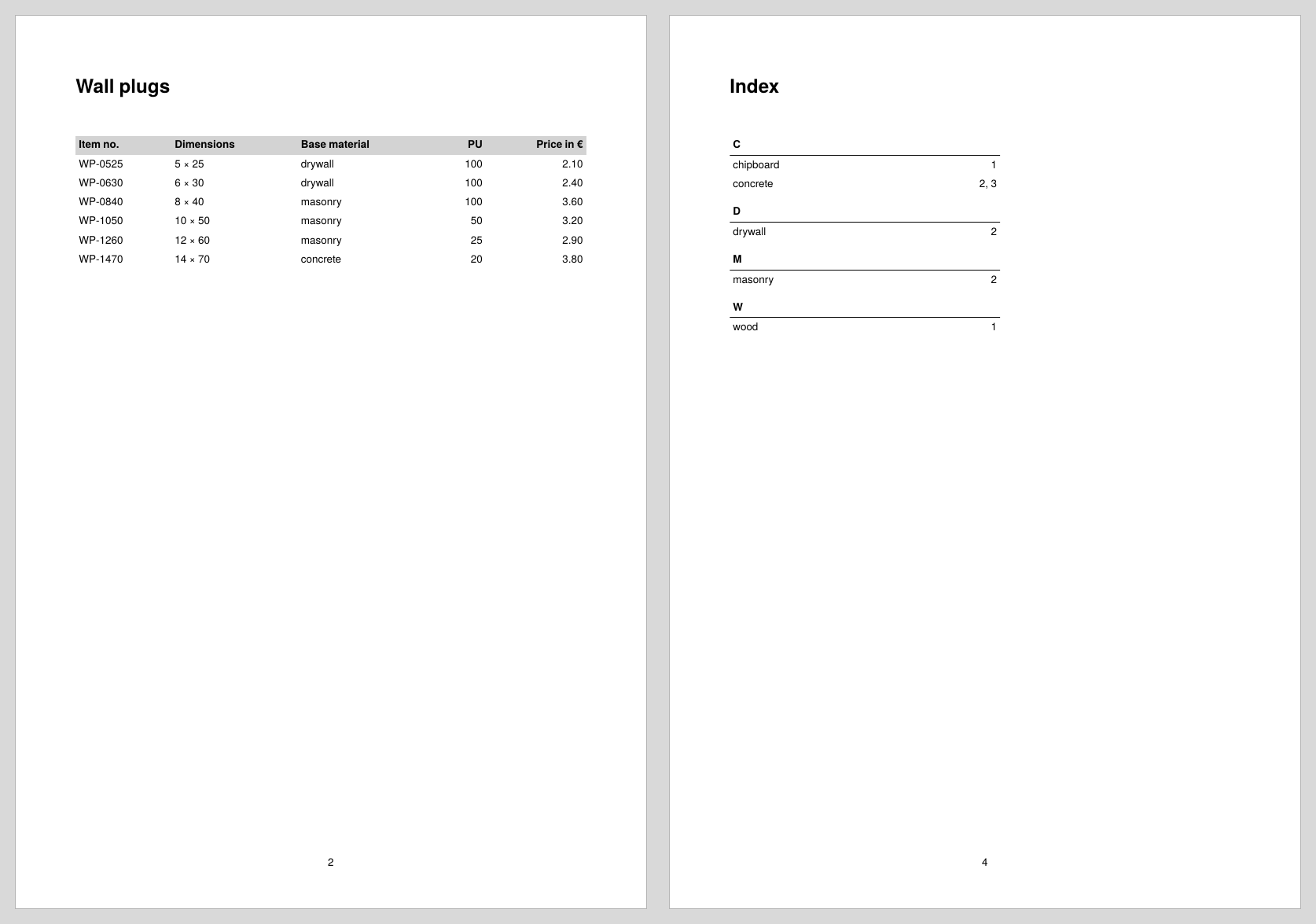
The Confixa catalog from the recipe Table of contents gets an index at the back: for each base material (wood, concrete, masonry, …) it lists the pages with matching articles. The keywords are sorted alphabetically and grouped by first letter, and repeated page numbers are merged.
Decision
A keyword index differs from a table of contents in two respects, and both simplify or change the approach:
- It is placed at the back. When the index is typeset, all catalog pages are already finished; the collected page numbers are complete. Saving and reloading across several runs (
<SaveDataset>/<LoadDataset>) is not needed, a single run suffices. - The entries do not come in document order. An index has to be sorted, grouped by first letter and freed of duplicates. This is what
<Makeindex>is for: it sorts, groups and concatenates the page numbers of identical keywords; the functionsd:merge-pagenumbers()then cleans up those page number lists.
If all you want is sorting, without sections and page numbers, use <SortSequence> instead; the chapter Sorting and grouping covers both commands.
Solution
Step 1: Collect the entries while typesetting
As with the table of contents, a variable is filled with entries while the catalog is typeset, here one entry per article with the base material and the current page. The collecting is done by a dedicated section for the article element, which the catalog section calls before outputting the table:
<Record element="group">
  <ProcessNode select="article"/>
  <!-- then heading and table as in the table of contents recipe -->
</Record>

<Record element="article">
  <SetVariable variable="indexentries">
    <Copy-of select="$indexentries"/>
    <Element name="indexentry">
      <Attribute name="name" select="@base"/>
      <Attribute name="page" select="sd:current-page()"/>
    </Element>
  </SetVariable>
</Record>
One detail matters here: the keyword must be stored in the attribute name; <Makeindex> expects this name when merging identical entries.
Instead of the dedicated section, the collecting could also sit directly in a <ForAll select="article"> in the catalog section; the separate <Record> merely keeps collecting and output apart.
Step 2: Sort and group with Makeindex
After the catalog, $indexentries contains one entry per article, in document order and full of repetitions. <Makeindex> turns this into the finished index structure:
<Record element="data">
  <SetVariable variable="indexentries"/>
  <ProcessNode select="group"/>

  <SetVariable variable="index">
    <Element name="baseindex">
      <Makeindex select="$indexentries/indexentry" sortkey="name"
                 section="section" pagenumber="page"/>
    </Element>
  </SetVariable>
  <ProcessNode select="$index/baseindex"/>
</Record>
Sorting uses the attribute named in sortkey, each first letter gets an element with the name from section, and the page numbers of identical entries are concatenated in the attribute named in pagenumber. The result looks like this:
<baseindex>
  <section name="C">
    <indexentry name="chipboard" page="1, 1, 1, 1, 1, 1, 1"/>
    <indexentry name="concrete" page="2, 3, 3, 3, 3, 3, 3, 3, 3"/>
  </section>
  <section name="D">
    <indexentry name="drywall" page="2, 2"/>
  </section>
  <!-- more sections -->
</baseindex>
The final <ProcessNode> interprets the variable as a data structure and jumps to the section for baseindex, which outputs the index.
Step 3: Output and merge page numbers
The output consists of two nested <ForAll>: the sections outside, the entries inside. The accumulated page number lists are cleaned up by sd:merge-pagenumbers(): the function sorts, removes duplicates and merges three or more consecutive pages into ranges; 2, 3, 3, 3 becomes 2, 3, and 4, 5, 6 becomes 4–6.
<Record element="baseindex">
  <PlaceObject>
    <Textblock>
      <Paragraph fontfamily="title"><Value>Index</Value></Paragraph>
    </Textblock>
  </PlaceObject>
  <PlaceObject row="{sd:current-row() + 1}">
    <Table padding="3pt">
      <Columns>
        <Column width="6cm"/>
        <Column width="3cm"/>
      </Columns>
      <ForAll select="section">
        <Tr break-below="no" top-distance="8pt">
          <Td colspan="2" border-bottom="1pt">
            <Paragraph><B><Value select="@name"/></B></Paragraph>
          </Td>
        </Tr>
        <ForAll select="indexentry">
          <Tr>
            <Td><Paragraph><Value select="@name"/></Paragraph></Td>
            <Td align="right">
              <Paragraph><Value select="sd:merge-pagenumbers(@page)"/></Paragraph>
            </Td>
          </Tr>
        </ForAll>
      </ForAll>
    </Table>
  </PlaceObject>
</Record>
Since the index is narrow, the table gets fixed column widths here instead of stretch="max"; the options are shown in the recipe Controlling column widths.
Complete example
The runnable project is also available in the examples repository. The data is the Confixa article list from the first recipe, extended by the attribute base with the base material; the catalog table shows it in a dedicated column:
<data company="Confixa">
  <group name="Chipboard screws" code="CS" material="steel, zinc plated">
    <article number="CS-3012" dim="3.0 × 12" drive="TX10" pu="1000"
             price="4.90" base="chipboard"/>
    <!-- more articles: base="chipboard" or base="wood" -->
  </group>
  <group name="Wall plugs" code="WP" material="nylon">
    <article number="WP-0525" dim="5 × 25" pu="100"
             price="2.10" base="drywall"/>
    <!-- more articles: base="drywall", "masonry" or "concrete" -->
  </group>
  <group name="Wedge anchors" code="WA" material="steel, zinc plated">
    <article number="WA-0875" dim="M8 × 75" pu="50"
             price="12.40" base="concrete"/>
    <!-- more articles: base="concrete" -->
  </group>
</data>
<Layout xmlns="urn:speedata.de:2009/publisher/en"
  xmlns:sd="urn:speedata:2009/publisher/functions/en">

  <Pagetype name="catalog" test="true()">
    <Margin left="20mm" right="20mm" top="20mm" bottom="20mm"/>
    <AtPageShipout>
      <PlaceObject column="20mm" row="280mm" allocate="no">
        <Textblock width="17" textformat="centered">
          <Paragraph><Value select="sd:current-page()"/></Paragraph>
        </Textblock>
      </PlaceObject>
    </AtPageShipout>
  </Pagetype>

  <DefineFontfamily name="title" fontsize="18" leading="22">
    <Regular fontface="sans-bold"/>
  </DefineFontfamily>

  <Record element="data">
    <SetVariable variable="indexentries"/>
    <ProcessNode select="group"/>

    <SetVariable variable="index">
      <Element name="baseindex">
        <Makeindex select="$indexentries/indexentry" sortkey="name"
                   section="section" pagenumber="page"/>
      </Element>
    </SetVariable>
    <ProcessNode select="$index/baseindex"/>
  </Record>

  <Record element="group">
    <ProcessNode select="article"/>

    <PlaceObject>
      <Textblock>
        <Paragraph fontfamily="title"><Value select="@name"/></Paragraph>
      </Textblock>
    </PlaceObject>
    <PlaceObject row="{sd:current-row() + 1}">
      <Table stretch="max" padding="3pt">
        <Tablehead>
          <Tr background-color="lightgray">
            <Td><Paragraph><B><Value>Item no.</Value></B></Paragraph></Td>
            <Td><Paragraph><B><Value>Dimensions</Value></B></Paragraph></Td>
            <Td><Paragraph><B><Value>Base material</Value></B></Paragraph></Td>
            <Td align="right"><Paragraph><B><Value>PU</Value></B></Paragraph></Td>
            <Td align="right"><Paragraph><B><Value>Price in €</Value></B></Paragraph></Td>
          </Tr>
        </Tablehead>
        <ForAll select="article">
          <Tr>
            <Td><Paragraph><Value select="@number"/></Paragraph></Td>
            <Td><Paragraph><Value select="@dim"/></Paragraph></Td>
            <Td><Paragraph><Value select="@base"/></Paragraph></Td>
            <Td align="right"><Paragraph><Value select="@pu"/></Paragraph></Td>
            <Td align="right"><Paragraph><Value select="@price"/></Paragraph></Td>
          </Tr>
        </ForAll>
      </Table>
    </PlaceObject>
    <ClearPage/>
  </Record>

  <Record element="article">
    <SetVariable variable="indexentries">
      <Copy-of select="$indexentries"/>
      <Element name="indexentry">
        <Attribute name="name" select="@base"/>
        <Attribute name="page" select="sd:current-page()"/>
      </Element>
    </SetVariable>
  </Record>

  <Record element="baseindex">
    <PlaceObject>
      <Textblock>
        <Paragraph fontfamily="title"><Value>Index</Value></Paragraph>
      </Textblock>
    </PlaceObject>
    <PlaceObject row="{sd:current-row() + 1}">
      <Table padding="3pt">
        <Columns>
          <Column width="6cm"/>
          <Column width="3cm"/>
        </Columns>
        <ForAll select="section">
          <Tr break-below="no" top-distance="8pt">
            <Td colspan="2" border-bottom="1pt">
              <Paragraph><B><Value select="@name"/></B></Paragraph>
            </Td>
          </Tr>
          <ForAll select="indexentry">
            <Tr>
              <Td><Paragraph><Value select="@name"/></Paragraph></Td>
              <Td align="right">
                <Paragraph><Value select="sd:merge-pagenumbers(@page)"/></Paragraph>
              </Td>
            </Tr>
          </ForAll>
        </ForAll>
      </Table>
    </PlaceObject>
  </Record>
</Layout>
Limits
- Content that breaks across pages.
sd:current-page()is evaluated when the table is built, not at the page break. Here the page numbers are correct because each group sits on its own page thanks to<ClearPage>. If the table breaks across pages automatically, the articles on the following pages get the wrong number. In that case, collect with markers instead of a variable:<Mark append="yes">is evaluated when the page is shipped out,sd:pagenumber()returns the page list andsd:merge-pagenumbers()merges it in the same way; see Markers. - Simple sorting.
<Makeindex>sorts and groups by the first character without language rules: keywords with umlauts end up after “Z” and do not form a usable section letter. For German-language indexes, normalize the keywords in the data or sort the data up front; the ways to do this are shown in Data preparation. - One level only. Two-level indexes (main and subentries) are beyond
<Makeindex>; build the structure yourself or prepare it up front with XSLT. - Reference:
<Makeindex>,<SortSequence>,sd:merge-pagenumbers()andsd:pagenumber()in the layout functions.