
Breaking complex tables manually
Task
At the end of each page, the Confixa article list is to point to the actual continuation page: “Continued on page 2”, “Continued on page 3” and so on, with real page numbers. The recipe Continuation head and continuation note ends exactly at this limit: with automatic table breaking, such notes are not possible. The same applies to all cases in which continuation pages need their own logic that depends on the break point.
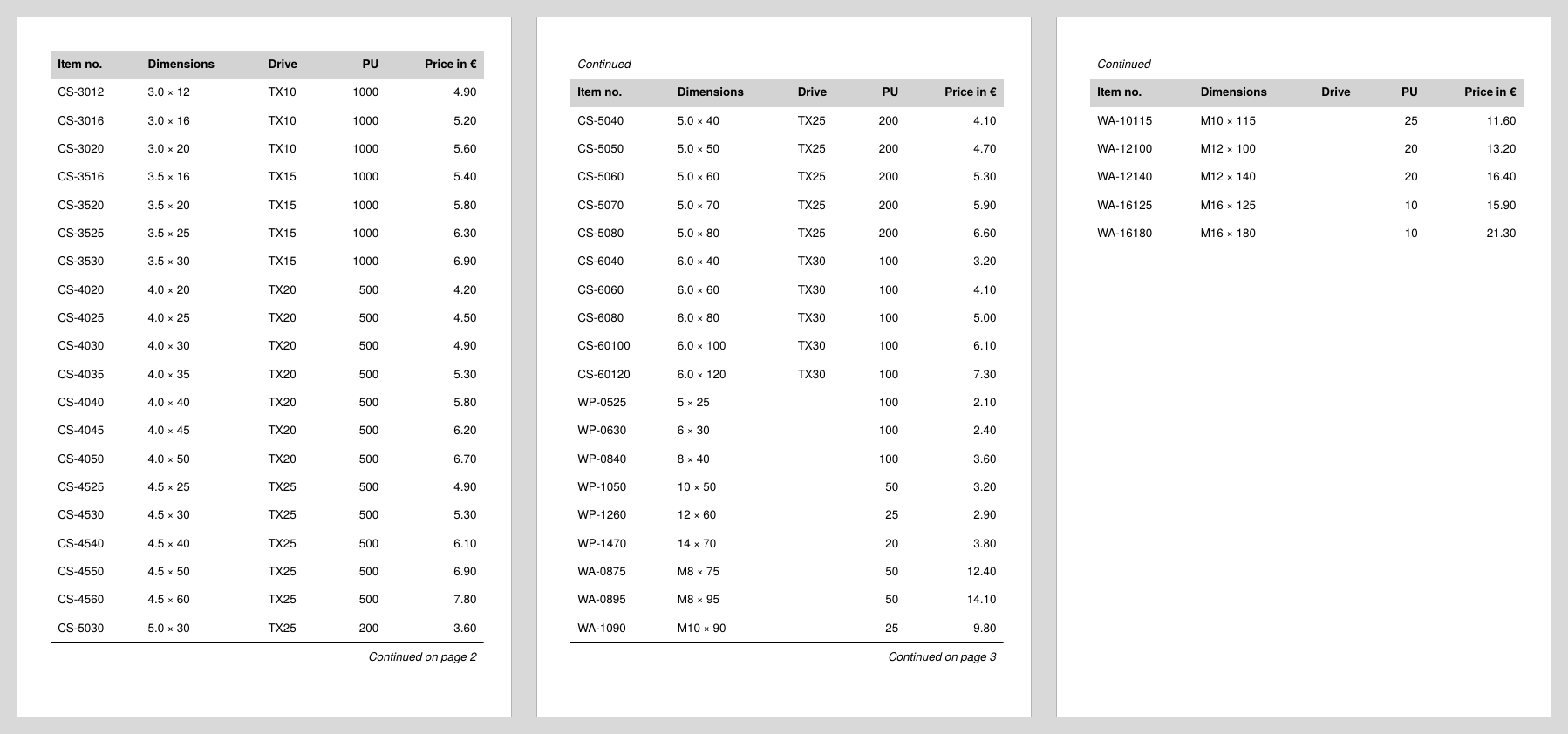
Decision
The first instinct is to keep the one big table and only vary the feet. This fails for a fundamental reason: the contents of <Tablehead> and <Tablefoot> are evaluated once when the table is built, not at every page break. At that moment not a single page has been output; sd:current-page() returns the same number everywhere, and it is not even known yet which row will end up on which page.
The viable approach turns the responsibility around: instead of letting the publisher break the table, you portion the table yourself. The core idea is measure-then-place with groups:
- Add the next row to the current portion on a trial basis, in a group that is typeset but not output.
- Compare the group height with the space remaining on the page.
- If it no longer fits: output the portion so far as its own complete table and continue on a new page.
Because each portion is only output when its page is the current one, all page-dependent information is correct, first and foremost the page numbers. And because each portion is a table of its own, every page may look different: its own heads, its own feet, its own intermediate elements, depending on where the break fell.
The price is considerably more layout code and processing time for measuring. So check first whether a simpler approach is enough: the automatic mechanism with page-dependent heads and feet (continuation head) covers many cases, and if you only want to force a page break at specific positions, <TableNewPage> within the automatic table will do.
Solution
Step 1: Rows as building blocks in variables
Table rows can be stored in variables and inserted into a table later with <Copy-of>. This turns head and rows into building blocks from which every portion table can be assembled. At the beginning, the two head variants are defined, the normal head and the one with the additional “Continued” row:
<SetVariable variable="headfirst">
  <Tr background-color="lightgray">
    <Td><Paragraph><B><Value>Item no.</Value></B></Paragraph></Td>
    <!-- more column titles as usual -->
  </Tr>
</SetVariable>
<SetVariable variable="headcont">
  <Tr>
    <Td colspan="5"><Paragraph><I><Value>Continued</Value></I></Paragraph></Td>
  </Tr>
  <Tr background-color="lightgray">
    <Td><Paragraph><B><Value>Item no.</Value></B></Paragraph></Td>
    <!-- more column titles as usual -->
  </Tr>
</SetVariable>

<SetVariable variable="headrow"><Copy-of select="$headfirst"/></SetVariable>
<SetVariable variable="tablerows"/>
$headrow is the head of the current portion; it starts with the normal variant and is switched to the continuation variant after the first break. $tablerows collects the rows of the current portion. Unlike when collecting data structures (recipe Keyword index), the variables here hold finished layout building blocks; <Copy-of> takes them over without a path expression.
Step 2: The continuation note is evaluated later
The note needs the page number of the following page, and that differs per portion. With execute="later", <SetVariable> stores its content unevaluated; only the <Copy-of> at the place of use executes it. This way sd:current-page() + 1 returns the correct number in every portion table:
<SetVariable variable="contfoot" execute="later">
  <Tablerule rulewidth="0.5pt"/>
  <Tr>
    <Td colspan="5" align="right">
      <Paragraph>
        <I>
          <Value>Continued on page </Value>
          <Value select="sd:current-page() + 1"/>
        </I>
      </Paragraph>
    </Td>
  </Tr>
</SetVariable>
The calculation + 1 is correct because after each output portion, <ClearPage> starts the next page immediately.
Step 3: Measuring with a group
Now a <ForAll> runs over all articles; this recipe omits the group heading rows from the first recipe to keep the measuring core clear (select="group/article" returns all articles as a flat list). For each article, the row is built and the prospective portion table is typeset on a trial basis in a group, together with the head, the rows so far, the new row and the continuation note:
<ForAll select="group/article">
  <SetVariable variable="thisrow">
    <Tr>
      <Td><Paragraph><Value select="@number"/></Paragraph></Td>
      <Td><Paragraph><Value select="@dim"/></Paragraph></Td>
      <Td><Paragraph><Value select="@drive"/></Paragraph></Td>
      <Td align="right"><Paragraph><Value select="@pu"/></Paragraph></Td>
      <Td align="right"><Paragraph><Value select="@price"/></Paragraph></Td>
    </Tr>
  </SetVariable>

  <Group name="portion">
    <Contents>
      <PlaceObject>
        <Table stretch="max" padding="6pt">
          <Copy-of select="$headrow"/>
          <Copy-of select="$tablerows"/>
          <Copy-of select="$thisrow"/>
          <Copy-of select="$contfoot"/>
        </Table>
      </PlaceObject>
    </Contents>
  </Group>
  <!-- evaluation follows in step 4 -->
</ForAll>
The content of a <Group> is typeset but not output; sd:group-height('portion') then returns the height in grid rows. The note is deliberately measured as well: whether the row still fits must be judged by the table that is actually output in the break case.
Step 4: The break
The decision is made by comparing the group height with the remaining space; sd:number-of-rows() - sd:current-row() + 1 is the number of grid rows still free on the page:
<Switch>
  <Case test="sd:group-height('portion') > sd:number-of-rows() - sd:current-row() + 1">
    <PlaceObject>
      <Table stretch="max" padding="6pt">
        <Copy-of select="$headrow"/>
        <Copy-of select="$tablerows"/>
        <Copy-of select="$contfoot"/>
      </Table>
    </PlaceObject>
    <ClearPage/>
    <SetVariable variable="headrow"><Copy-of select="$headcont"/></SetVariable>
    <SetVariable variable="tablerows"><Copy-of select="$thisrow"/></SetVariable>
  </Case>
  <Otherwise>
    <SetVariable variable="tablerows">
      <Copy-of select="$tablerows"/>
      <Copy-of select="$thisrow"/>
    </SetVariable>
  </Otherwise>
</Switch>
If the new row no longer fits, the portion is output without it, followed by the continuation note; <ClearPage> ends the page. From now on the continuation head applies, and the new portion starts with exactly the row that did not fit. In the normal case, the row is simply appended to the portion.
Step 5: The last portion
After the <ForAll>, the remaining rows are still in $tablerows. They form the last table, this time without a continuation note:
<PlaceObject>
  <Table stretch="max" padding="6pt">
    <Copy-of select="$headrow"/>
    <Copy-of select="$tablerows"/>
  </Table>
</PlaceObject>
Complete example
The runnable project is also available in the examples repository; the data file is the Confixa article list from the first recipe. As with the continuation head, the A5 format and the generous padding produce three pages for the illustration.
<Layout xmlns="urn:speedata.de:2009/publisher/en"
  xmlns:sd="urn:speedata:2009/publisher/functions/en">

  <Pageformat width="148mm" height="210mm"/>

  <Record element="data">
    <SetVariable variable="headfirst">
      <Tr background-color="lightgray">
        <Td><Paragraph><B><Value>Item no.</Value></B></Paragraph></Td>
        <Td><Paragraph><B><Value>Dimensions</Value></B></Paragraph></Td>
        <Td><Paragraph><B><Value>Drive</Value></B></Paragraph></Td>
        <Td align="right"><Paragraph><B><Value>PU</Value></B></Paragraph></Td>
        <Td align="right"><Paragraph><B><Value>Price in €</Value></B></Paragraph></Td>
      </Tr>
    </SetVariable>
    <SetVariable variable="headcont">
      <Tr>
        <Td colspan="5"><Paragraph><I><Value>Continued</Value></I></Paragraph></Td>
      </Tr>
      <Tr background-color="lightgray">
        <Td><Paragraph><B><Value>Item no.</Value></B></Paragraph></Td>
        <Td><Paragraph><B><Value>Dimensions</Value></B></Paragraph></Td>
        <Td><Paragraph><B><Value>Drive</Value></B></Paragraph></Td>
        <Td align="right"><Paragraph><B><Value>PU</Value></B></Paragraph></Td>
        <Td align="right"><Paragraph><B><Value>Price in €</Value></B></Paragraph></Td>
      </Tr>
    </SetVariable>
    <SetVariable variable="contfoot" execute="later">
      <Tablerule rulewidth="0.5pt"/>
      <Tr>
        <Td colspan="5" align="right">
          <Paragraph>
            <I>
              <Value>Continued on page </Value>
              <Value select="sd:current-page() + 1"/>
            </I>
          </Paragraph>
        </Td>
      </Tr>
    </SetVariable>

    <SetVariable variable="headrow"><Copy-of select="$headfirst"/></SetVariable>
    <SetVariable variable="tablerows"/>

    <ForAll select="group/article">
      <SetVariable variable="thisrow">
        <Tr>
          <Td><Paragraph><Value select="@number"/></Paragraph></Td>
          <Td><Paragraph><Value select="@dim"/></Paragraph></Td>
          <Td><Paragraph><Value select="@drive"/></Paragraph></Td>
          <Td align="right"><Paragraph><Value select="@pu"/></Paragraph></Td>
          <Td align="right"><Paragraph><Value select="@price"/></Paragraph></Td>
        </Tr>
      </SetVariable>

      <Group name="portion">
        <Contents>
          <PlaceObject>
            <Table stretch="max" padding="6pt">
              <Copy-of select="$headrow"/>
              <Copy-of select="$tablerows"/>
              <Copy-of select="$thisrow"/>
              <Copy-of select="$contfoot"/>
            </Table>
          </PlaceObject>
        </Contents>
      </Group>

      <Switch>
        <Case test="sd:group-height('portion') > sd:number-of-rows() - sd:current-row() + 1">
          <PlaceObject>
            <Table stretch="max" padding="6pt">
              <Copy-of select="$headrow"/>
              <Copy-of select="$tablerows"/>
              <Copy-of select="$contfoot"/>
            </Table>
          </PlaceObject>
          <ClearPage/>
          <SetVariable variable="headrow"><Copy-of select="$headcont"/></SetVariable>
          <SetVariable variable="tablerows"><Copy-of select="$thisrow"/></SetVariable>
        </Case>
        <Otherwise>
          <SetVariable variable="tablerows">
            <Copy-of select="$tablerows"/>
            <Copy-of select="$thisrow"/>
          </SetVariable>
        </Otherwise>
      </Switch>
    </ForAll>

    <PlaceObject>
      <Table stretch="max" padding="6pt">
        <Copy-of select="$headrow"/>
        <Copy-of select="$tablerows"/>
      </Table>
    </PlaceObject>
  </Record>
</Layout>
Limits
- Measuring takes time. For each row, the entire portion so far is typeset again; the effort grows with the square of the rows per page. For price lists this is uncritical, for very large catalogs it becomes noticeable.
- The convenience of the automatic mechanism is gone. Row rules such as
break-below="no"(group heading stays with its rows) have to be rebuilt yourself, for example by measuring the heading row together with the first article row. The group heading rows from the first recipe are further building blocks in the same pattern. - The note is always measured as well, even on the last page where it is omitted; in the worst case one row of space remains there. To avoid this, you would have to know in advance which article is the last one.
- Page number of the following page:
sd:current-page() + 1assumes that the next portion follows directly on the next page. With inserted pages (such as chapter dividers) the note has to calculate accordingly. - Reference:
<Group>,<Switch>,<SetVariable>(attributeexecute),sd:group-height()andsd:number-of-rows()in the layout functions.