
Table of contents
Task
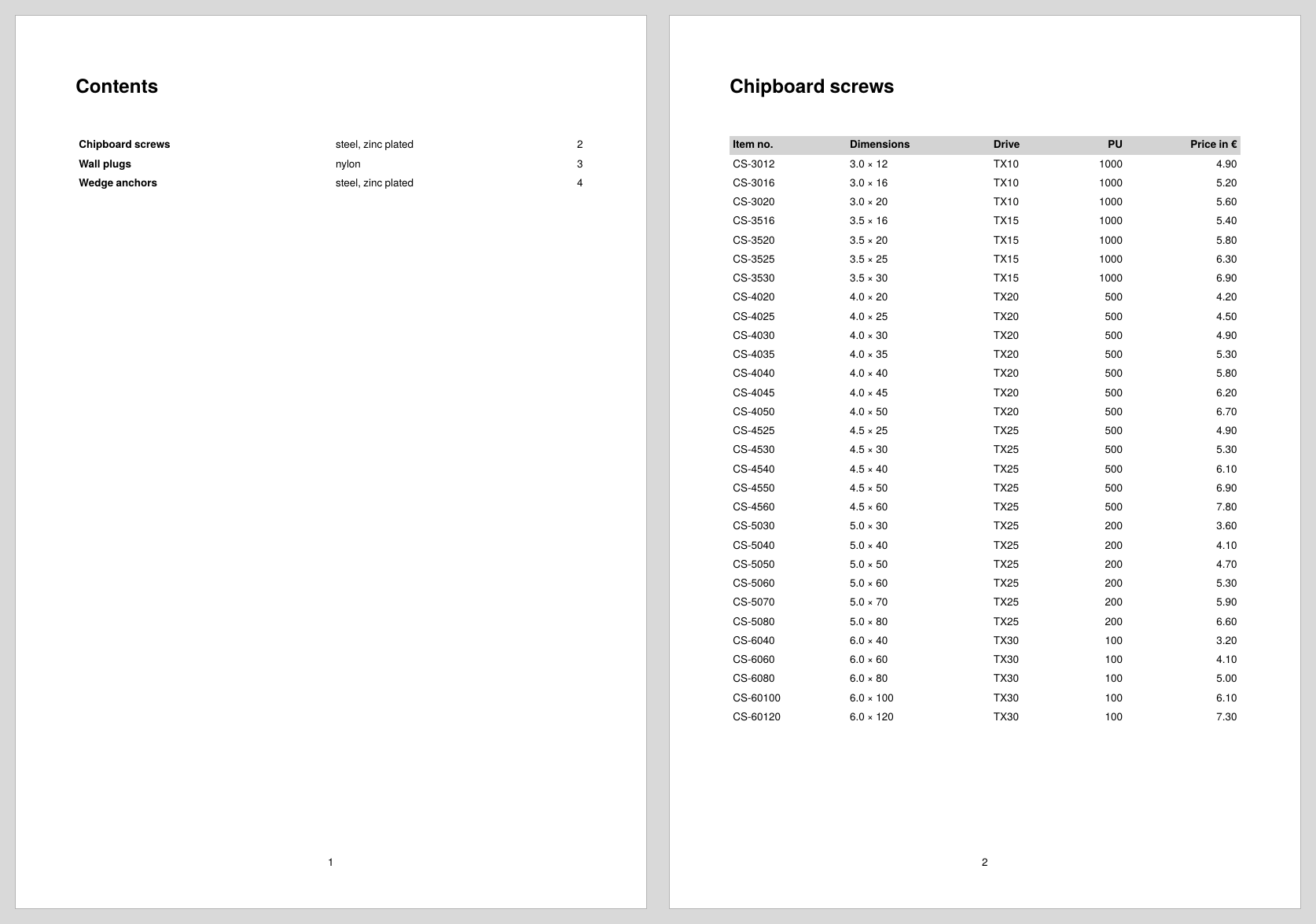
The Confixa catalog outputs each article group on its own page. A table of contents is to appear at the front: one line per group with its name, material and the page on which the group starts.
Decision
The fundamental problem of every directory: the page numbers are only known once the catalog has been typeset, but the directory appears at the front. The publisher solves this with multiple runs: one run collects the entries while typesetting and saves them to a file, the next run reads the file at startup and outputs the directory before the content is typeset.
There are three methods for collecting; the comparison table is in the chapter Directories & lists:
- Markers:
<Mark>marks positions,sd:pagenumber()returns the page number, and the publisher takes care of saving. The simplest way when all you need are page numbers for known names. - XML data set: the entries are assembled yourself and saved with
<SaveDataset>. The right way as soon as the directory is to contain more than page numbers; here that is the material of the group. - Single pass:
<InsertPages>reserves the directory pages at the front,<SavePages>fills them at the end of the same run. Requires that the length of the directory is known in advance.
This recipe uses the XML data set, the most flexible of the three methods and at the same time the pattern for all other lists (article lists, image directories, indexes).
Solution
Step 1: The catalog, one page per group
The catalog itself is quickly built: each group gets a heading and its article table, <ClearPage> ends the page. To make the page numbers visible in the result, a page type outputs them in the foot; the technique is explained in the recipe Basic structure of a data sheet.
<Record element="data">
  <ProcessNode select="group"/>
</Record>

<Record element="group">
  <PlaceObject>
    <Textblock>
      <Paragraph fontfamily="title"><Value select="@name"/></Paragraph>
    </Textblock>
  </PlaceObject>
  <PlaceObject row="{sd:current-row() + 1}">
    <Table stretch="max" padding="3pt">
      <!-- table head and article rows as in the first table recipe -->
    </Table>
  </PlaceObject>
  <ClearPage/>
</Record>
Step 2: Collect the entries while typesetting
For each group, a directory entry is added to the variable entries at the very moment the group is typeset; sd:current-page() then returns the correct page. The commands <Element> and <Attribute> assemble an XML structure for this, and <Copy-of> takes over the previous entries each time:
<Record element="group">
  <SetVariable variable="entries">
    <Copy-of select="$entries"/>
    <Element name="entry">
      <Attribute name="name" select="@name"/>
      <Attribute name="material" select="@material"/>
      <Attribute name="page" select="sd:current-page()"/>
    </Element>
  </SetVariable>
  <!-- output as in step 1 -->
</Record>
After the last group, $entries contains the complete directory as a data structure:
<entry name="Chipboard screws" material="steel, zinc plated" page="2"/>
<entry name="Wall plugs" material="nylon" page="3"/>
<entry name="Wedge anchors" material="steel, zinc plated" page="4"/>
Step 3: Save and reload
The entry point data gets three new lines: at the beginning, <SetVariable> initializes the variable empty (so the first <Copy-of> finds something), and at the end <SaveDataset> writes the collected entries to disk under the root element tableofcontents. <LoadDataset> reads the file back in on the next run; on the first run it does not exist yet, and the command is silently skipped.
<Record element="data">
  <LoadDataset name="toc"/>
  <SetVariable variable="entries"/>
  <ProcessNode select="group"/>
  <SaveDataset name="toc" elementname="tableofcontents"
               select="$entries"/>
</Record>
The file ends up as publisher-toc.xml in the working directory (the name from name prefixed with the job name); looking inside helps with understanding and debugging.
Step 4: Output the directory
<LoadDataset> interrupts the processing and looks for a <Record> for the root element of the loaded file, here tableofcontents. This section outputs the directory as a table, one row per entry; the final <ClearPage> pushes the catalog to page 2:
<Record element="tableofcontents">
  <PlaceObject>
    <Textblock>
      <Paragraph fontfamily="title"><Value>Contents</Value></Paragraph>
    </Textblock>
  </PlaceObject>
  <PlaceObject row="{sd:current-row() + 1}">
    <Table stretch="max" padding="3pt">
      <ForAll select="entry">
        <Tr>
          <Td><Paragraph><B><Value select="@name"/></B></Paragraph></Td>
          <Td><Paragraph><Value select="@material"/></Paragraph></Td>
          <Td align="right"><Paragraph><Value select="@page"/></Paragraph></Td>
        </Tr>
      </ForAll>
    </Table>
  </PlaceObject>
  <ClearPage/>
</Record>
Step 5: Three runs
The command line does the rest:
sp --runs 3
Why three? On the first run there is no directory yet, the catalog starts on page 1 and the entries are saved with these page numbers. On the second run the directory is added at the front, all groups move back one page, so the saved page numbers change once more. Only the third run outputs the directory with the final numbers. In the example: 3 pages, then 4 pages with still incorrect directory numbers, then 4 pages correct.
Instead of the command line, the number can also be set in the configuration file (runs = 3, see Configuration) or, since version 5.9.4, directly in the layout with <Options runs="3" />. This way the layout runs correctly without any extra settings.
Complete example
The runnable project is also available in the examples repository; the data file is the Confixa article list from the first recipe.
<Layout xmlns="urn:speedata.de:2009/publisher/en"
  xmlns:sd="urn:speedata:2009/publisher/functions/en">

  <Pagetype name="catalog" test="true()">
    <Margin left="20mm" right="20mm" top="20mm" bottom="20mm"/>
    <AtPageShipout>
      <PlaceObject column="20mm" row="280mm" allocate="no">
        <Textblock width="17" textformat="centered">
          <Paragraph><Value select="sd:current-page()"/></Paragraph>
        </Textblock>
      </PlaceObject>
    </AtPageShipout>
  </Pagetype>

  <DefineFontfamily name="title" fontsize="18" leading="22">
    <Regular fontface="sans-bold"/>
  </DefineFontfamily>

  <Record element="data">
    <LoadDataset name="toc"/>
    <SetVariable variable="entries"/>
    <ProcessNode select="group"/>
    <SaveDataset name="toc" elementname="tableofcontents"
                 select="$entries"/>
  </Record>

  <Record element="group">
    <SetVariable variable="entries">
      <Copy-of select="$entries"/>
      <Element name="entry">
        <Attribute name="name" select="@name"/>
        <Attribute name="material" select="@material"/>
        <Attribute name="page" select="sd:current-page()"/>
      </Element>
    </SetVariable>

    <PlaceObject>
      <Textblock>
        <Paragraph fontfamily="title"><Value select="@name"/></Paragraph>
      </Textblock>
    </PlaceObject>
    <PlaceObject row="{sd:current-row() + 1}">
      <Table stretch="max" padding="3pt">
        <Tablehead>
          <Tr background-color="lightgray">
            <Td><Paragraph><B><Value>Item no.</Value></B></Paragraph></Td>
            <Td><Paragraph><B><Value>Dimensions</Value></B></Paragraph></Td>
            <Td><Paragraph><B><Value>Drive</Value></B></Paragraph></Td>
            <Td align="right"><Paragraph><B><Value>PU</Value></B></Paragraph></Td>
            <Td align="right"><Paragraph><B><Value>Price in €</Value></B></Paragraph></Td>
          </Tr>
        </Tablehead>
        <ForAll select="article">
          <Tr>
            <Td><Paragraph><Value select="@number"/></Paragraph></Td>
            <Td><Paragraph><Value select="@dim"/></Paragraph></Td>
            <Td><Paragraph><Value select="@drive"/></Paragraph></Td>
            <Td align="right"><Paragraph><Value select="@pu"/></Paragraph></Td>
            <Td align="right"><Paragraph><Value select="@price"/></Paragraph></Td>
          </Tr>
        </ForAll>
      </Table>
    </PlaceObject>
    <ClearPage/>
  </Record>

  <Record element="tableofcontents">
    <PlaceObject>
      <Textblock>
        <Paragraph fontfamily="title"><Value>Contents</Value></Paragraph>
      </Textblock>
    </PlaceObject>
    <PlaceObject row="{sd:current-row() + 1}">
      <Table stretch="max" padding="3pt">
        <ForAll select="entry">
          <Tr>
            <Td><Paragraph><B><Value select="@name"/></B></Paragraph></Td>
            <Td><Paragraph><Value select="@material"/></Paragraph></Td>
            <Td align="right"><Paragraph><Value select="@page"/></Paragraph></Td>
          </Tr>
        </ForAll>
      </Table>
    </PlaceObject>
    <ClearPage/>
  </Record>
</Layout>
Limits
- The number of runs is fixed.
--runsdoes not check whether anything still changes. If the directory itself grows beyond one page or entries shift again because of other dynamic content, correspondingly more runs are needed. - One run instead of three: if the length of the directory is known in advance (almost always the case for catalogs), the pages can be reserved at the front with
<InsertPages>and filled at the end with<SavePages>; this is described in Table of contents in a single run. - Dot leaders to the page number: Instead of the table, each entry can be a paragraph with tabs, for example with
tab-stops="100% right leader(' . ')"in the text format and<Value select="concat(@name, '	', @page)"/>. The dots then lead from the title to the page number flush right, see Tab stops. - Only page numbers needed? Then the marker method is simpler: no collecting, no saving, the publisher manages the markers itself.
- Keyword indexes additionally need sorting and merging of page numbers; this is shown in the recipe Keyword index.
- Reference:
<SaveDataset>,<LoadDataset>,<Element>,<Attribute>,<Copy-of>.