
Markdown
| The markdown support is considered experimental, there will be changes to the code. |
You can render text with markdown, a common markup “language” for text. See https://www.markdownguide.org for example if you want to learn about markdown.
To use markdown in your document, just call the sd:markdown function:
<Layout xmlns="urn:speedata.de:2009/publisher/en"
    xmlns:sd="urn:speedata:2009/publisher/functions/en">

    <Record element="data">
        <PlaceObject>
            <Textblock>
                <Paragraph>
                    <Value select="sd:markdown(.)" />
                </Paragraph>
            </Textblock>
        </PlaceObject>
    </Record>
</Layout>
with the data file:
<data>
# A title

* one
* anotherone
* three
</data>
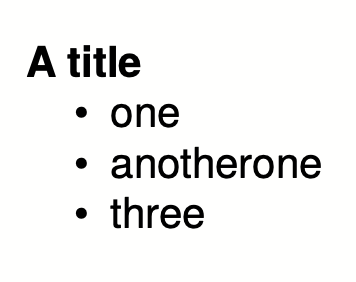
renders a h1 title and a bullet list:
Markdown extensions
There are several markdown extensions that are used to create tables, footnotes and other gimmicks. Some of them are supported by the speedata Publisher. The implementation will be improved in due time. Some of the extensions automatically activate others. Just try them out.
| Feature | Description |
|---|---|
gfm | GitHub flavored markdown |
table | Use tables |
strikethrough | Some helpers for ~ strikethrough |
linkify | Create automatic links |
definitionlist | definition lists |
footnote | Footnotes |
typographer | This extension substitutes punctuations with typographic entities like smartypants |
highlight | Source code highlighting |
These options can be set like
<Options markdown-extensions="highlight,table" />
You can also select the highlight style with the prefix hlstyle_, for example
<Options markdown-extensions="highlight,hlstyle_tango" />
The list of available styles is at https://github.com/alecthomas/chroma/tree/master/styles .
You can also set rendering options with the prefix hloption_. Currently only hloption_withclasses is supported, which has the effect that classes are used instead of <span>...</span> for syntax highlighting.
A speedata Publisher quine using markdown
This section should be taken with a grain of salt… With markdown it is now easily possible to create a layout.xml quine
.
Run the following layout with sp --dummy and you will get a PDF which reproduces itself:
<Layout xmlns="urn:speedata.de:2009/publisher/en"
xmlns:sd="urn:speedata:2009/publisher/functions/en">
<Options markdown-extensions="highlight,hlstyle_tango" />
<Record element="data">
<SetVariable
variable="raw"
select="unparsed-text('layout.xml')" />
<SetVariable
variable="fenced"
select="concat('```xml
', $raw ,'
```'))"/>
<PlaceObject>
<Textblock>
<Paragraph>
<Value select="sd:markdown($fenced)" />
</Paragraph>
</Textblock>
</PlaceObject>
</Record>
</Layout>
The explanation is simple. With unparsed-text() the layout.xml is loaded without interpretation, then enclosed with pass:[```] (three backticks) and line breaks and output as markdown.
The three backticks mean that the content is not interpreted but only placed in the PDF (with all spaces as in the input itself).