
Create images with MetaPost
MetaPost is a programming language that can be used to create graphics. For example, one creates from the following program code:
beginfig(1)
    for a=0 upto 9:
      draw (0,0){dir 45}..{dir -10a}(6cm,0);
    endfor
endfig;
this graphic:

MetaPost and the speedata Publisher
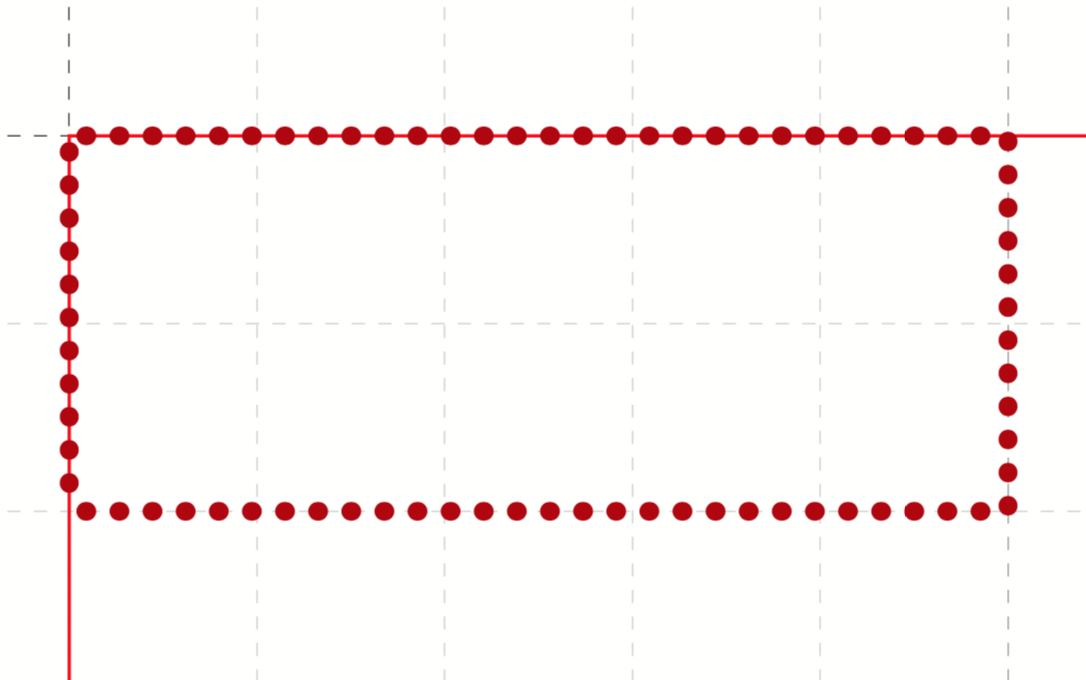
The idea now is to be able to use these images in the speedata Publisher as well. To do this, you first define a graphic and then use it later in the box command:
<Layout
    xmlns="urn:speedata.de:2009/publisher/en"
    xmlns:sd="urn:speedata:2009/publisher/functions/en">

    <!-- no beginfig() ... endfig necessary -->
    <DefineGraphic name="dottedbox">
      pickup pencircle scaled 1mm;
      draw (0,0) -- (box.width,0) -- (box.width, box.height) --
        (box.width, box.height) -- (0, box.height ) -- cycle
        dashed withdots withcolor 0.7red ;
    </DefineGraphic>

    <!-- same, but uses predefined path box: -->
    <DefineGraphic name="dottedboxsimple">
        pickup pencircle scaled 1mm;
        draw box dashed withdots withcolor 0.7red ;
    </DefineGraphic>

    <Record element="data">
        <PlaceObject row="1" column="1">
            <Box height="2" width="5" graphic="dottedbox" />
        </PlaceObject>
    </Record>
</Layout>
The width of the box and the height of the box are defined with the variables box.width and box.height in MetaPost.
This allows you to adjust the graphic to the defaults in the Publisher.
Coordinates
The origin of the coordinate system is in the lower left corner of the box, so positive values go in the right and up direction.
Variables
Variables for MetaPost can be set with <SetVariable>.
<SetVariable
    variable="curcol"
    type="mp:rgbcolor"
    select="'colors_mycolor'"/>
The assignment is evaluated at the beginning of the MetaPost context. Thus curcol is available at the beginning of the graphics. Variables may contain the following characters: A-Z, a-z and _ (underscore).
Predefined values
- All colors defined in the layout can be used in MetaPost with the prefix
colors.:
<DefineColor name="mycolor" value="#FF4E00"/>

<DefineGraphic name="dots">
    pickup pencircle scaled 3mm;
    for i=0 upto 3:
        draw (i * 1cm, i * 1cm) withcolor colors.mycolor ;
    endfor;
</DefineGraphic>

<Record element="data">
    <PlaceObject row="1" column="1">
        <Box height="5" width="1" graphic="dots" />
    </PlaceObject>
</Record>
- CSS level 3 colors are defined in RGB colorspace.
- The width and height of a box can be accessed via
box.widthandbox.height - The box’ path is saved in the variable
box(see the example above). - Hans Hagen’s MetaFun macro package is included (parts of it).
- In page types you can also access these variables:
Variable Description page.widthPage width page.heightPage height page.margin.leftMargin left page.margin.rightMargin right page.margin.topMargin top page.margin.bottomMargin bottom page.trimBleed
Text in MetaPost
sptext("Hello, world!","text","regular")
The arguments are: the text for output, the font family and the variant. The possible values for the variant are: regular, bold, italic and bolditalic.
Example usage with label:
label.top(sptext("origin","text","regular"),(0,0));
Alternatively to the verbose macro there is the short form:
defaultfontfamily := "mptext";
defaultfontstyle := "bold";

draw txt("Hello, world!");
Renders the text in the font family mptext and the variant bold.
Transparency
To get a transparency effect you can supplement a color with the keyword withalpha and a factor. This factor is between 0 (invisible) und 1 (full color).
fill box scaled 0.5 shifted (-20,-20);
fill box withcolor rebeccapurple withalpha 0.6;
MetaPost macros
The macros contained in the “plain” format are included in the speedata Publisher. In addition, the following (partly from MetaFun).
Verschiebungen etc.
xshifted,yshifted- Movement in one direction.
draw unitsquare xshifted 3cm;
xyscaled- Scaling with different values for x and y.
draw unitsquare xyscaled (2cm,5cm);
randomshifted- Shift with random values.
draw unitsquare randomshifted (2cm,5cm);
superellipsed- Transformation to a “superellipse”.
draw box superellipsed 0.9;
roundedsquare- Rectangle with rounded corners.
draw roundedsquare(box.width,box.height,.25cm);
withalpha- Change color intensity (1.0 = full color, 0 = no color).
fill unitsquare withalpha 0.7;
randomized- Randomize the values. A value can be path, a pair or a color.
draw box randomized 2cm;
Paths
box- Rectangle from the layout with the provided width and height.
draw box;
Image commands
drawdot- Draw a dot at a given position.
drawdot origin;
spcolor- Gets a color from the previously defined colors. Can only be used with
withcolor. The difference to using a color from thecolors.variable is that the color space is preserved and not converted to RGB.fill box withcolor spcolor(“mycolor”);
Text
sptext- Text with information about the font and the variant. The possible values are described under
defaultfontfamilyanddefaultfontstyle.draw sptext(“Hello”,“text”,“bold”);
txt- Text that uses the defaults
defaultfontfamilyanddefaultfontstyle.
Options
defaultfontfamily- Font family which will be used with
txt(). The family must have been previously defined in the layout. defaultfontstyle- Font style used with
txt(). Possible styles:regular,bold,italic,bolditalic.
MetaPost resources
There are a number of manuals and tutorials for MetaPost:
- The MetaPost manual (mpman) can be obtained from CTAN: http://mirrors.ctan.org/systems/doc/metapost/mpman.pdf
- Learning MetaPost by doing by André Heck: https://staff.fnwi.uva.nl/a.j.p.heck/Courses/mptut.pdf
- MetaPost examples: http://tex.loria.fr/prod-graph/zoonekynd/metapost/metapost.html
- A Beginner’s Guide to MetaPost for Creating High-Quality Graphics http://www.tug.org/pracjourn/2006-4/henderson/henderson.pdf
- Puzzling graphics in MetaPost https://www.pragma-ade.com/articles/art-puzz.pdf
- MetaFun (a macro package that is based on MetaPost - not all commands are supported by the speedata Publisher) https://www.pragma-ade.com/general/manuals/metafun-p.pdf