
Sorting of keyword indexes
As a rule, keyword indexes can be found at the end of a document in order to quickly locate relevant pages in printed works. These keywords can be words or even article numbers or other designations.
In contrast to the table of contents (which is usually at the front of a publication), the data only has to be compiled; there is usually no need to save the data temporarily for the next run.
Example
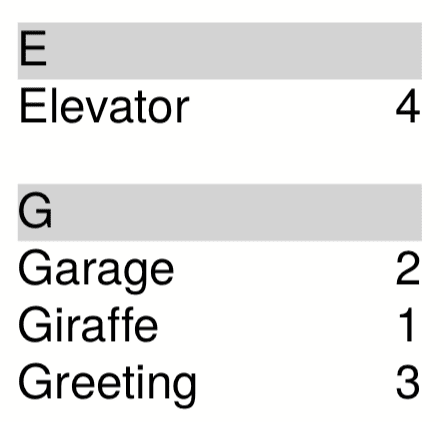
By their nature, the examples are always somewhat contrived, and that is especially the case here. The index is compiled differently in practice, of course. Since only the sorting is to be shown here, the keyword and the page number are given. You can find all the files in the examples repository .
<data>
  <keyword word="Giraffe" page="1"/>
  <keyword word="Garage" page="2"/>
  <keyword word="Greeting" page="3"/>
  <keyword word="Elevator" page="4"/>
</data>
The layout file consists of three sections, which are explained individually.
<Layout xmlns="urn:speedata.de:2009/publisher/en"
  xmlns:sd="urn:speedata:2009/publisher/functions/en">

  <Record element="data"> <!--1-->
    ...
  </Record>

  <Record element="keyword"> <!--2-->
    ...
  </Record>

  <Record element="index"> <!--3-->
    ...
  </Record>
</Layout>
- The frame that first assembles the entries, sorts and then outputs them.
- Here the entries are stored individually in the variable
indexentries. - The sorted entries are output in a table.
The data record is the first part of the previous listing:
  <Record element="data">
    <SetVariable variable="indexentries"/> <!--1-->
    <ProcessNode select="keyword"/>

    <SetVariable variable="index">  <!--2-->
      <Element name="index">
        <Makeindex select="$indexentries/indexentry" sortkey="name" section="section"
                   pagenumber="page" />
      </Element>
    </SetVariable>

    <ProcessNode select="$index/index"/>  <!--3-->
  </Record>
- An empty variable
indexentriesis declared. This is filled with the individual elements in the recordkeyword(see below). - The now filled variable
indexentriesis supplemented by the parent elementindex, sorted and stored in$index. - Here the content of the variable
$indexis interpreted and executed as a data structure (see the addition below).
The command <Makeindex> sorts and groups the data passed in the attribute select.
Sorting is done using the attribute specified in sortkey.
The grouping is based on the first letter of the sort key.
The element structure, which is created with the command <Makeindex>, is as follows:
<index>
  <section name="E">
    <indexentry name="Elevator" page="4"/>
  </section>
  <section name="G">
    <indexentry name="Garage" page="2"/>
    <indexentry name="Giraffe" page="1"/>
    <indexentry name="Greeting" page="3"/>
  </section>
</index>
The section on the keyword element (insert at position 1 in the listing ) is kept simple, and corresponds to the “copy of” pattern (see copyof
).
Here the variable indexentries is supplemented by one entry each.
  <Record element="keyword">
    <SetVariable variable="indexentries">
      <Copy-of select="$indexentries"/>
      <Element name="indexentry">
        <Attribute name="name" select="@word"/> <!--1-->
        <Attribute name="page" select="@page"/>
      </Element>
    </SetVariable>
  </Record>
- In the current publisher version, the entry that is sorted must be saved in an attribute called
name.
In the last part the table is output (insert at position 3 in the listing ).
For each section (element section in <Makeindex>) a line in light grey is output with the sort key.
Then, for each entry within this section, a line is output with the name of the entry and the page number.
  <Record element="index">
    <PlaceObject column="1">
      <Table width="3" stretch="max">
        <ForAll select="section">
          <Tr break-below="no" top-distance="10pt">
            <Td colspan="2" background-color="lightgray">
              <Paragraph><Value select="@name"></Value></Paragraph>
            </Td>
          </Tr>
          <ForAll select="indexentry">
            <Tr>
              <Td>
                <Paragraph><Value select="@name"/></Paragraph>
              </Td>
              <Td align="right">
                <Paragraph><Value select="@page"/></Paragraph>
              </Td>
            </Tr>
          </ForAll>
        </ForAll>
      </Table>
    </PlaceObject>
  </Record>