
Using fonts
Embedding fonts in the common formats is very easy. The formats TrueType and OpenType (files .ttf and .otf) are supported.
Type 1 fonts (files .pfb) are not supported since version 6.0. Please convert Type 1 fonts to OpenType. |
To make fonts known and used by the publisher, two steps are necessary. The first step is to load a font file:
<LoadFontfile name="MinionRegular" filename="MinionPro-Regular.otf" />
This assigns the file name MinionPro-Regular.otf the internal name MinionRegular. In the second step, these internal names are then used to define families:
<DefineFontfamily name="textfont" fontsize="9pt" leading="11pt">
  <Regular fontface="MinionRegular"/>
  <Bold fontface="MinionBold"/>
  <Italic fontface="MinionItalic"/>
  <BoldItalic fontface="MinionBoldItalic"/>
</DefineFontfamily>
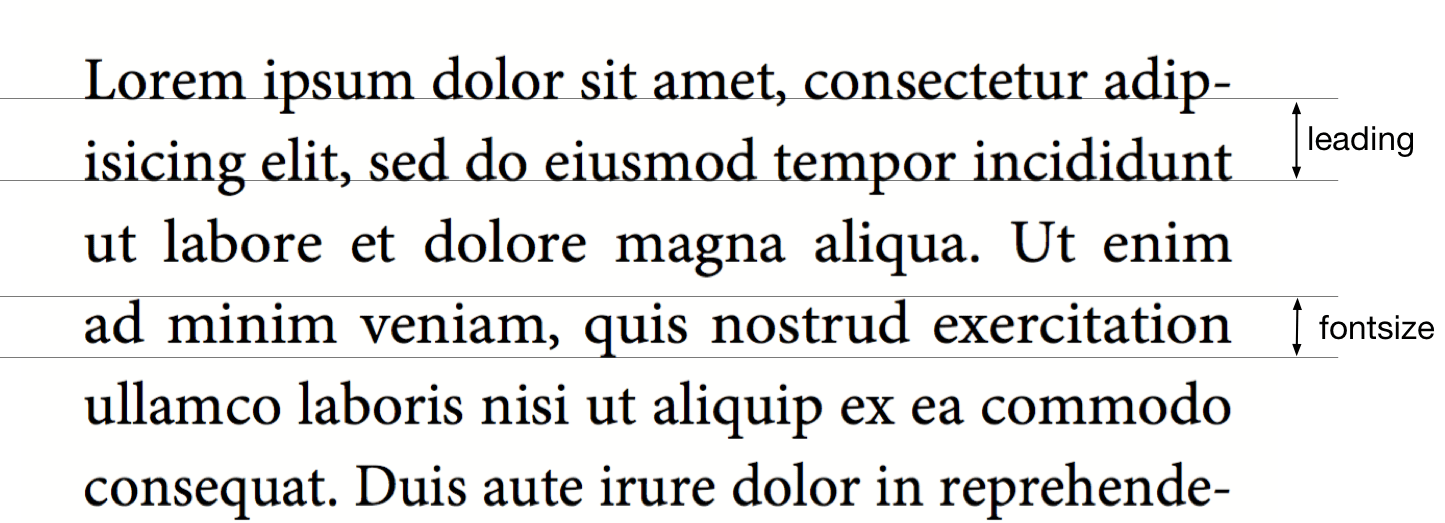
The last three styles (bold, italic, and bold italic) do not have to be specified if they are not used in the layout. fontsize is the font height, leading is the distance between two baselines.
The font is used in different ways: in the commands <Textblock>, <Text>, <Paragraph>, <Table>, <NoBreak> and <Barcode>, a font can be specified with the attribute fontfamily, e.g. <Paragraph fontfamily="text font">. You can temporarily switch to another family with the command <Fontface fontfamily="...">:
<Paragraph>
  <Fontface fontfamily="title">
    <Value>Preface</Value>
  </Fontface>
  <Value> more text</Value>
</Paragraph>
Text markup in the layout rules
There are several ways to switch to bold, italic, and bold-italic styles. The most direct one is to switch with the commands <B> and <I>, these can also be nested within each other:
<PlaceObject>
  <Textblock fontfamily="textfont">
    <Paragraph>
      <Value>A wonderful </Value>
      <B><Value>serenity</Value></B>
      <Value> has taken possession </Value>
      <I><Value>of my</Value>
        <Value> </Value>
        <B><Value>entire soul,</Value></B>
      </I>
      <Value> like these sweet mornings.</Value>
    </Paragraph>
  </Textblock>
</PlaceObject>

Further markup commands such as <U> (underline), <Sub>/<Sup>, <Color> or <A> are described in the section Text formatting.
Text markup in the data
If there are markups in the data (e.g. as HTML tags), then this works in principle in exactly the same way:
<PlaceObject>
  <Textblock fontfamily="textfont">
    <Paragraph>
      <Value select="."/>
    </Paragraph>
  </Textblock>
</PlaceObject>
with the corresponding data:
<data>A wonderful <b>serenity</b> has taken possession
  <i>of my <b>entire soul,</b></i> like these sweet
  mornings.</data>
The result is the same as above. The tags can also be written in capital letters in the data: <B> instead of <b>. Nesting is also allowed and again <u> is underlined.
If the data is not in well-formed XML but in HTML format for example, you can use the layout function sd:decode-html() to interpret it. An example is shown in the section HTML in Paragraph. |
Outline font
The font-outline attribute can be used to specify the line width for an outline font:
<PlaceObject>
    <Textblock>
        <Paragraph font-outline="0.3pt">
            <Value>Hello nice world</Value>
        </Paragraph>
    </Textblock>
</PlaceObject>

Accessing glyphs by ID
The function sd:symbol() can be used to output individual glyphs by their ID from the current font. This is useful when a character is not accessible via Unicode, e.g. with symbol fonts or decorative typefaces:
<Paragraph>
  <Value select="sd:symbol(123, 444)" />
</Paragraph>
Glyph IDs can be determined using tools like fonttools or a font editor.
OpenType Features
The OpenType format knows so-called OpenType features, such as old style figures or small caps. Some of these features can be activated at <LoadFontfile>.
<Layout
  xmlns="urn:speedata.de:2009/publisher/en"
  xmlns:sd="urn:speedata:2009/publisher/functions/en">

  <!-- Oldstyle figures / text figures -->
  <LoadFontfile
    name="MinionRegular-osf"
    filename="MinionPro-Regular.otf"
    oldstylefigures="yes" />

  <!-- Small caps -->
  <LoadFontfile
    name="MinionRegular-smcp"
    filename="MinionPro-Regular.otf"
    smallcaps="yes" />

  <DefineFontfamily name="osftext" fontsize="10" leading="12">
    <Regular fontface="MinionRegular-osf"/>
  </DefineFontfamily>

  <DefineFontfamily name="smcptext" fontsize="10" leading="12">
    <Regular fontface="MinionRegular-smcp"/>
  </DefineFontfamily>

  <Record element="data">
    <PlaceObject>
      <Textblock>
        <Paragraph fontfamily="osftext">
          <Value>Text with oldstyle figures 1234567890</Value>
        </Paragraph>
        <Paragraph fontfamily="smcptext">
          <Value>Text with small caps 1234567890</Value>
        </Paragraph>
      </Textblock>
    </PlaceObject>
  </Record>
</Layout>

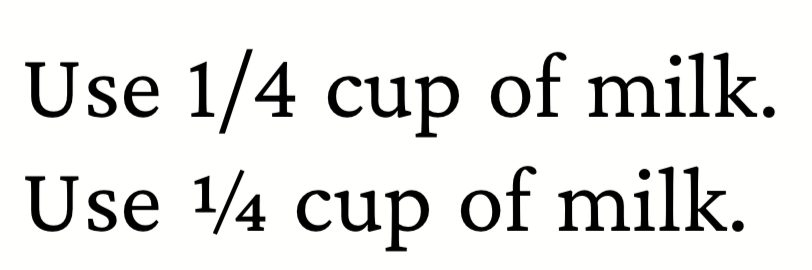
Additional OpenType features can be set with the features attribute, for example
<LoadFontfile name="CrimsonPro-Regular"
  filename="CrimsonPro-Regular.ttf" />
<LoadFontfile name="CrimsonPro-Regular-frac"
  filename="CrimsonPro-Regular.ttf"
  features="+frac" />
A complete description of the OpenType features can be found on
https://docs.microsoft.com/en-us/typography/opentype/spec/featurelist.
The default features are the ones that are mentioned in the harfbuzz manual but without liga.
Variable Fonts
Variable fonts are font files that contain multiple design axes in a single file. Instead of requiring a separate file for each style (e.g. Thin, Regular, Bold, Black), you can create any number of instances with different axis values from a single file.
Common axes are:
wght– Weight (e.g. 100 = Thin, 400 = Regular, 700 = Bold, 900 = Black)wdth– Width (e.g. 75 = Condensed, 100 = Normal, 125 = Expanded)opsz– Optical sizeital– Italicslnt– Slant
For the most common axes wght and wdth, there are shortcut attributes:
<LoadFontfile name="MyFont-Thin"
  filename="MyFont-Variable.ttf" weight="100" />
<LoadFontfile name="MyFont-Regular"
  filename="MyFont-Variable.ttf" weight="400" />
<LoadFontfile name="MyFont-Bold"
  filename="MyFont-Variable.ttf" weight="700" />
For arbitrary axes (including custom ones), the <Axis> child element can be used:
<LoadFontfile name="MyFont-SemiboldCondensed"
              filename="MyFont-Variable.ttf">
  <Axis name="wght" value="600" />
  <Axis name="wdth" value="75" />
</LoadFontfile>
Both approaches can be combined. The weight and width attributes take precedence over <Axis> elements with the same tag:
<LoadFontfile name="MyFont-LightOptical12"
              filename="MyFont-Variable.ttf" weight="300">
  <Axis name="opsz" value="12" />
</LoadFontfile>
The resulting instances behave like regular static font files and can be used in <DefineFontfamily> as usual:
<LoadFontfile name="Text-Regular"
  filename="MyFont-Variable.ttf" weight="400" />
<LoadFontfile name="Text-Bold"
  filename="MyFont-Variable.ttf" weight="700" />

<DefineFontfamily name="text" fontsize="10pt" leading="12pt">
  <Regular fontface="Text-Regular" />
  <Bold fontface="Text-Bold" />
</DefineFontfamily>
In which directory must the font files be located?
The organization of the files, and thus the fonts, is described in the section File Organization. With sp --systemfonts when calling the publisher, you can access the system-wide font files.
Tips and tricks
In order to save yourself work in defining fonts, you can use the command
$ sp list-fonts --xml
This will then list all font files found, together with a line that can be used directly in the layout.
$ sp list-fonts --xml
<LoadFontfile name="DejaVuSans-Bold"
              filename="DejaVuSans-Bold.ttf" />
<LoadFontfile name="DejaVuSans-BoldOblique"
              filename="DejaVuSans-BoldOblique.ttf" />
<LoadFontfile name="DejaVuSans-ExtraLight"
              filename="DejaVuSans-ExtraLight.ttf" />
...
| If no font is specified for a paragraph or text block (etc.), the system uses the text font family, which is also predefined in the Publisher and can be overridden. See the Preferences in the Publisher appendix. |
Missing characters and replacement fonts
The character sets in the font files are usually very limited. For example, the speedata Publisher is delivered with the free font “TeXGyreHeros” (a very good Helvetica clone). However, the font file only contains characters that cover western languages, but not, for example, Greek, Arabic, Chinese etc. Also the whole Unicode special characters like U+2685 DIE FACE-6 (⚅) are not included. If a character is requested that is not contained in the font, an error message is displayed.
Error: Glyph f1c7 (hex) is missing from the font "TeXGyreHeros-Regular"
This error can be suppressed with the command
<Options reportmissingglyphs="no"/>
Alternatively, you can also specify a replacement font at <LoadFontfile>, which will be searched as soon as a character is not found:
<LoadFontfile name="helvetica" filename="texgyreheros-regular.otf">
  <Fallback filename="fontawesome-webfont.ttf" />
  <Fallback filename="line-awesome.ttf" />
</LoadFontfile>
First the font texgyreheros-regular.otf is searched, then fontawesome-webfont.ttf and finally line-awesome.ttf.
Aliases
There is a command to add an alternate name for an existing font name to the list of known font names:
<DefineFontalias existing="..." alias="..."/>
The commands
<LoadFontfile name="DejaVuSerif"
        filename="DejaVuSerif.ttf" />
<LoadFontfile name="DejaVuSerif-Bold"
        filename="DejaVuSerif-Bold.ttf" />
<LoadFontfile name="DejaVuSerif-BoldItalic"
        filename="DejaVuSerif-BoldItalic.ttf" />
<LoadFontfile name="DejaVuSerif-Italic"
        filename="DejaVuSerif-Italic.ttf" />

<DefineFontalias existing="DejaVuSerif" alias="serif"/>
<DefineFontalias existing="DejaVuSerif-Bold" alias="serif-bold"/>
<DefineFontalias existing="DejaVuSerif-Italic" alias="serif-italic"/>
<DefineFontalias existing="DejaVuSerif-BoldItalic"
         alias="serif-bolditalic"/>
now allow to define font families in general as follows:
<DefineFontfamily name="title" fontsize="15" leading="17">
  <Regular fontface="serif"/>
  <Bold fontface="serif-bold"/>
  <BoldItalic fontface="serif-bolditalic"/>
  <Italic fontface="serif-italic"/>
</DefineFontfamily>
i.e. independent of the font actually used. With the options described in the section splitlayout, you can now move the font definition into a separate file and, if necessary, quickly choose between different fonts by including the desired files.