
Mathematical formulas
Mathematical formulas are typeset with the command <Math>. The contents are written in MathML, the markup language for formulas that is also used in HTML and in many editorial systems. The formulas are typeset by the math engine of LuaTeX, with the spacing and sizes known from TeX.
The command is experimental. The supported MathML subset grows with the next versions, the limits are listed at the end of this page.
Loading a math font
Formulas need an OpenType font with a MATH table, for example Latin Modern Math, STIX Two Math, Libertinus Math or TeX Gyre Pagella Math. The font is loaded like any other font and defined as a font family. The sizes for superscripts and subscripts are derived from the values in the font.
<LoadFontfile name="mathfont" filename="latinmodern-math.otf"/>
<DefineFontfamily name="mathfont" fontsize="10" leading="12">
    <Regular fontface="mathfont"/>
</DefineFontfamily>
The first <Math> element in the layout names the font family with the attribute fontfamily. All later formulas use the same font, the attribute can then be omitted. Only one math font per document is supported at the moment.
Formulas in running text
<Math> is placed inside <Paragraph> next to <Value> and the other text commands. The child elements are MathML; the root element <math> and the MathML namespace may be given but are not required.
<Paragraph>
  <Value>The Pythagorean theorem </Value>
  <Math fontfamily="mathfont">
    <msup><mi>a</mi><mn>2</mn></msup>
    <mo>+</mo>
    <msup><mi>b</mi><mn>2</mn></msup>
    <mo>=</mo>
    <msup><mi>c</mi><mn>2</mn></msup>
  </Math>
  <Value> holds in right triangles.</Value>
</Paragraph>

The most important MathML elements:
<mi>- Identifiers. Single letters are set in italics (
x,a,α), function names of several letters upright and with a small space before the argument (sin,lim,log). Withmathvariant="normal"a single letter stays upright, for example the d in dx or the constants e and i. <mn>- Numbers.
<mo>- Operators. The publisher knows the class of every character (binary operator, relation, parenthesis, large operator) and sets the spacing accordingly. A minus can be written as
-or as−. <mrow>- Groups several elements, for example as the numerator of a fraction.
<mfrac>,<msqrt>,<mroot>- Fraction with numerator and denominator, square root, root with index. With
linethickness="0"the fraction bar is omitted, which gives binomial coefficients. <mspace>- Extra space, for example
<mspace width="1em"/>before the dx of an integral. <mstyle>- Changes the style of the enclosed elements:
displaystyle="true"sets a fraction in running text at full size,scriptlevel="1"shrinks the contents to the size of a superscript. <msup>,<msub>,<msubsup>- Superscript and subscript. A prime as exponent (
<msup><mi>f</mi><mo>′</mo></msup>) is set as a derivative mark and not raised a second time. <munder>,<mover>,<munderover>- Expressions below and above a base. On large operators such as
∑they become limits, with accent characters such as^,¯,~or→they become accents (vector arrow, overline), otherwise a small expression above or below the base, for examplex → 0belowlim.
Displayed formulas
With display="yes" the formula is set in display style: fractions get larger, the limits of sums are placed above and below the operator. The formula remains part of the paragraph; for a line of its own it gets its own paragraph.
<Paragraph>
  <Math display="yes">
    <munderover><mo>∑</mo><mrow><mi>k</mi><mo>=</mo><mn>1</mn></mrow><mi>n</mi></munderover>
    <mi>k</mi>
    <mo>=</mo>
    <mfrac>
      <mrow><mi>n</mi><mo>(</mo><mi>n</mi><mo>+</mo><mn>1</mn><mo>)</mo></mrow>
      <mn>2</mn>
    </mfrac>
  </Math>
</Paragraph>
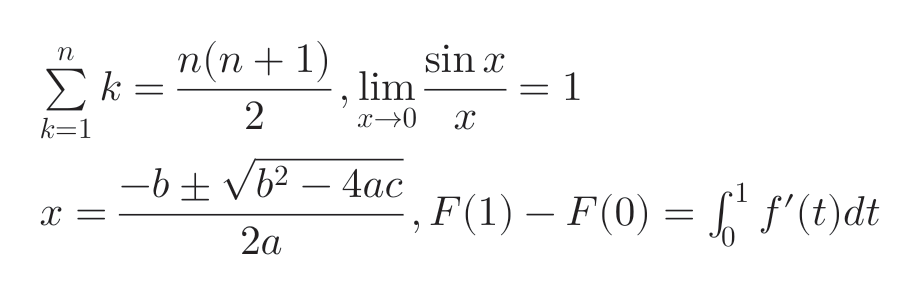
A formula line is at least as high as a text line of the paragraph font. For tall formulas (fractions, sums with limits) the line grows so that the formula does not reach into the neighboring lines. For an even distance between several displayed formulas, use a font family with a larger leading for these paragraphs.
The formula takes the color of the paragraph (attribute color on <Paragraph>).
Limits
Not yet supported are:
<mtable>(alignment of multi-line equations)- the values bold, fraktur and script of the attribute
mathvariant - several math fonts in one document
<mtext>in the text font of the paragraph; the text is currently set from the math font
Unknown MathML elements are treated like <mrow> with a warning, so the formula is not dropped.