Writing systems
The speedata Publisher typesets text in many writing systems. The built-in text shaping (HarfBuzz) computes the forms of the characters automatically, for example the joined letters of Arabic or the syllables of Indic scripts. This section describes what else applies to the individual writing systems: the writing direction, line breaking, the language setting and the known limitations.
For all writing systems:
- The font must contain the characters. If some characters are missing, you can add replacement fonts.
- The language should be correct if it is in the list of languages. With fonts that cover several languages, it selects the matching forms of the characters. If the language is not in the list, use
Other; then the text shaping detects the writing system itself.
Arabic, Hebrew and other right-to-left scripts
If a paragraph contains Arabic or Hebrew characters, the Publisher determines the writing direction automatically (“bidi algorithm”):
- The paragraph runs in the direction of its first letter. So an Arabic paragraph is right-to-left, even without
direction. - Latin words and numbers in right-to-left text run from left to right.
- Brackets are mirrored.
<Layout xmlns="urn:speedata.de:2009/publisher/en"
    xmlns:sd="urn:speedata:2009/publisher/functions/en">
  <LoadFontfile name="Amiri" filename="amiri-regular.ttf" />
  <DefineFontfamily fontsize="10" leading="14" name="text">
    <Regular fontface="Amiri" />
  </DefineFontfamily>
  <Record element="data">
    <PlaceObject>
      <Textblock width="6cm">
        <Paragraph>
          <Value select="."/>
        </Paragraph>
      </Textblock>
    </PlaceObject>
  </Record>
</Layout>
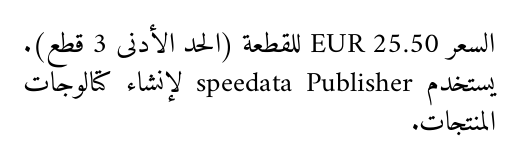
<data>السعر 25.50 EUR للقطعة (الحد الأدنى 3 قطع). يستخدم speedata Publisher لإنشاء كتالوجات المنتجات.</data>
With direction="rtl" or direction="ltr" on the paragraph you set the direction instead of taking it from the first letter.
This is useful if a paragraph starts with a word of the “wrong” direction, for example an Arabic sentence that starts with a product name.
bidi="no" switches the direction analysis off; then Latin words and numbers in right-to-left text are reversed, though.
For ragged text, use the alignment start and end in the text format instead of leftaligned and rightaligned.
start and end follow the direction of the paragraph, see <DefineTextformat>.
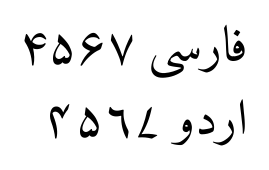
The languages Arabic, Persian, Urdu and Hebrew select the regional forms with fonts that support them, for example the Urdu digits:
<Paragraph language="Persian"><Value>فارسی ۴۵۶۷</Value></Paragraph>
<Paragraph language="Urdu"><Value>اردو ۴۵۶۷</Value></Paragraph>
Known limitations:
- If the formatting changes inside an Arabic word (for example one bold letter), the letters lose their connection at this position.
- Justification distributes the space to the word spaces. Stretching the connecting line (kashida) is not supported.
- In HTML contents, the attribute
dirand the CSS propertydirectionare not evaluated.
Chinese, Japanese and Korean
Chinese and Japanese text is broken between all characters, without setting a language, and also if the paragraph starts with a Latin word. The usual rules for the start and the end of a line apply:
- Closing brackets and punctuation such as
》,」,,and。do not start a line. - Opening brackets such as
《and「do not end a line. - Small kana (
ャ,ッ…) and the prolonged sound markーdo not start a line. ……and——are not split.
In justified text the extra space is distributed evenly between the characters. Korean text is broken at the spaces, as usual in Korean.
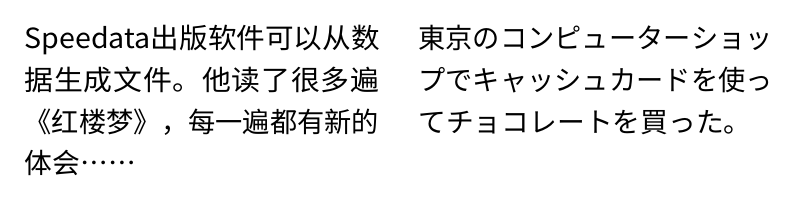
<Paragraph language="Chinese">
  <Value>Speedata出版软件可以从数据生成文件。他读了很多遍《红楼梦》,每一遍都有新的体会……</Value>
</Paragraph>
<Paragraph language="Japanese">
  <Value>東京のコンピューターショップでキャッシュカードを使ってチョコレートを買った。</Value>
</Paragraph>
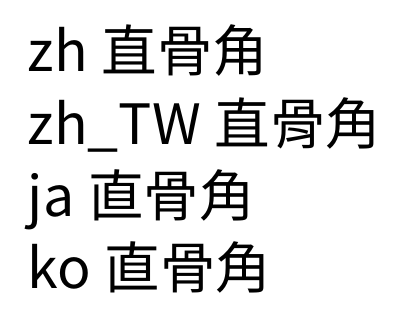
The same characters partly have different forms in China, Taiwan, Japan and Korea.
Fonts such as Noto Sans CJK or Source Han Sans contain all forms; the language selects the matching one.
The languages are Chinese (simplified characters), Chinese (Traditional) (traditional characters), Japanese and Korean.
<Paragraph language="Chinese"><Value>zh 直骨角</Value></Paragraph>
<Paragraph language="Chinese (Traditional)"><Value>zh_TW 直骨角</Value></Paragraph>
<Paragraph language="Japanese"><Value>ja 直骨角</Value></Paragraph>
<Paragraph language="Korean"><Value>ko 直骨角</Value></Paragraph>
Known limitations:
- Consecutive punctuation such as
。」is not compressed. In narrow columns with a lot of punctuation, lines can be stretched a lot. - Small kana at the start of a line are always prohibited; the loose rule that allows them cannot be selected.
- Vertical text, ruby (reading aids such as pinyin or furigana) and emphasis dots are not supported.
Thai, Lao, Khmer and Burmese
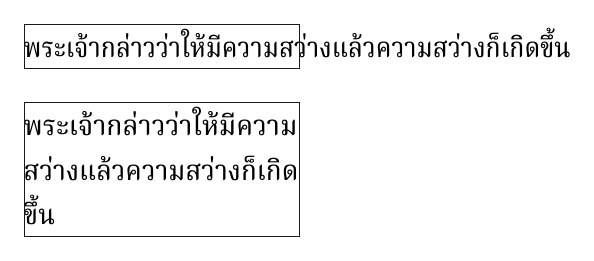
In these scripts there are no spaces between the words. Where a word ends can only be found with a dictionary, and the Publisher has none. So the word boundaries must be in the data, as zero width spaces (U+200B). Without them, the text can only be broken at the real spaces and long sentences run out of the text block.
<Paragraph>
<Value>พระเจ้า​กล่าว​ว่า​ให้​มี​ความ​สว่าง…</Value>
</Paragraph>
The best place to insert the word boundaries is the data preparation, with a library that has a dictionary for the language, for example ICU (BreakIterator, available for many programming languages) or PyThaiNLP for Python. Inserting U+200B at fixed intervals is not a good idea: then lines are broken inside syllables. If a U+200B is directly before a tone mark or vowel sign, the Publisher ignores it, so that the mark does not stand alone at the start of a line.
The word joiner U+2060 prevents a line break at a certain position, see Controlling line breaks with special characters.
Indic scripts
The text shaping builds the syllables of Indic scripts (Devanagari, Bengali, Tamil …) automatically, including the half forms and ligatures that are controlled with ZWJ (U+200D) and ZWNJ (U+200C).
Lines are broken at the spaces; a danda (।, ॥) does not start a line, even if there is a space before it.
There is currently no hyphenation for Indic scripts, not even with the languages Hindi, Gujarati, Kannada, Malayalam and Sanskrit.
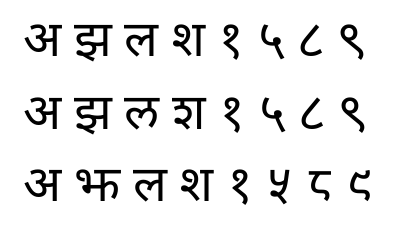
With fonts that support it, the language selects the regional forms. Some characters have their own forms in Marathi and Nepali, for example:
<Paragraph language="Hindi"><Value>अ झ ल श १ ५ ८ ९</Value></Paragraph>
<Paragraph language="Marathi"><Value>अ झ ल श १ ५ ८ ९</Value></Paragraph>
<Paragraph language="Nepali"><Value>अ झ ल श १ ५ ८ ९</Value></Paragraph>
Besides Hindi, Marathi and Nepali there are the languages Assamese, Bengali, Gujarati, Kannada, Malayalam, Odia, Punjabi, Sanskrit, Tamil and Telugu.
For other languages, use Other.
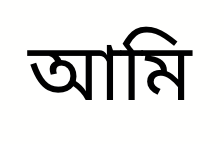
<Paragraph language="Bengali">
  <Value>আমি</Value>
</Paragraph>