Tab Stops
Tab stops line up text inside a paragraph: the numbers and titles of a table of contents, the prices of a price list. A tab moves the text after it to the next stop, which can align the text at its start, its end, its center or its decimal separator, and fill the gap with a leader.
Two things are needed:
- the stops, set with the CSS property
-bag-tab-stops, usually in a class, - the tabs in the text, written as
<Tab/>.
A table of contents
<StyleSheet>
  p.toc     { -bag-tab-stops: 10mm, 100% end leader(dotted); }
  p.section { -bag-tab-stops: 10mm, 22mm, 100% end leader(dotted); }
</StyleSheet>

<Record match="data">
  <PlaceObject>
    <TextBlock width="140mm">
      <ForAll select="chapter">
        <Paragraph class="toc">
          <Value select="@no"/><Tab/><Value select="@title"/><Tab/><Value select="@page"/>
        </Paragraph>
        <ForAll select="section">
          <Paragraph class="section">
            <Tab/><Value select="@no"/><Tab/><Value select="@title"/><Tab/><Value select="@page"/>
          </Paragraph>
        </ForAll>
      </ForAll>
    </TextBlock>
  </PlaceObject>
</Record>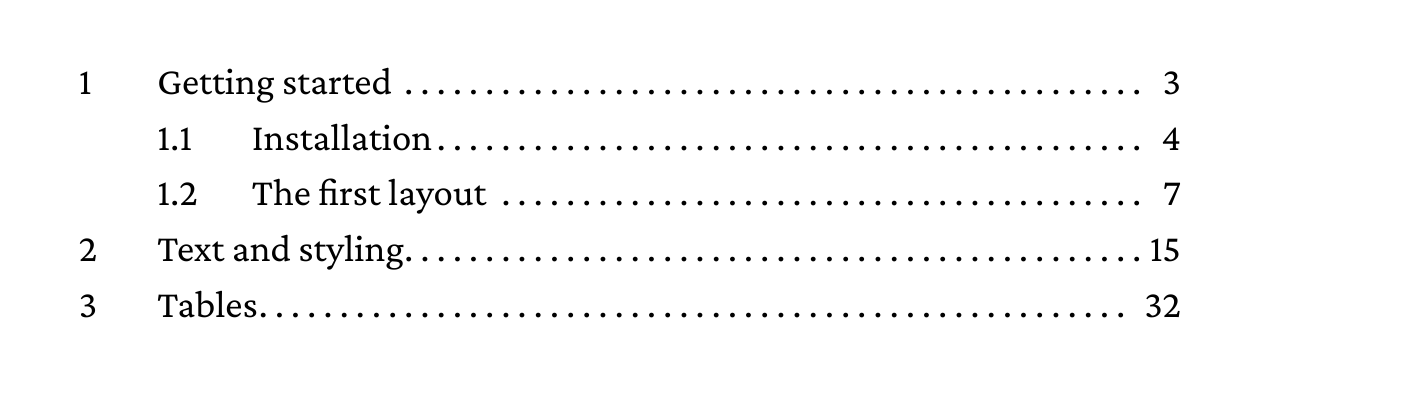
The title starts at 10mm, the page number ends at the right edge of the text block (100% end), and the gap before it is filled with dots. A section starts with a tab, so its number moves to the first stop.
A price list
<StyleSheet>
  p.price { -bag-tab-stops: 105mm decimal leader(dotted), 115mm; }
</StyleSheet>

<Record match="data">
  <PlaceObject>
    <TextBlock width="140mm">
      <ForAll select="item">
        <Paragraph class="price">
          <Value select="@name"/><Tab/><Value select="@price"/><Tab/><Value select="@unit"/>
        </Paragraph>
      </ForAll>
    </TextBlock>
  </PlaceObject>
</Record>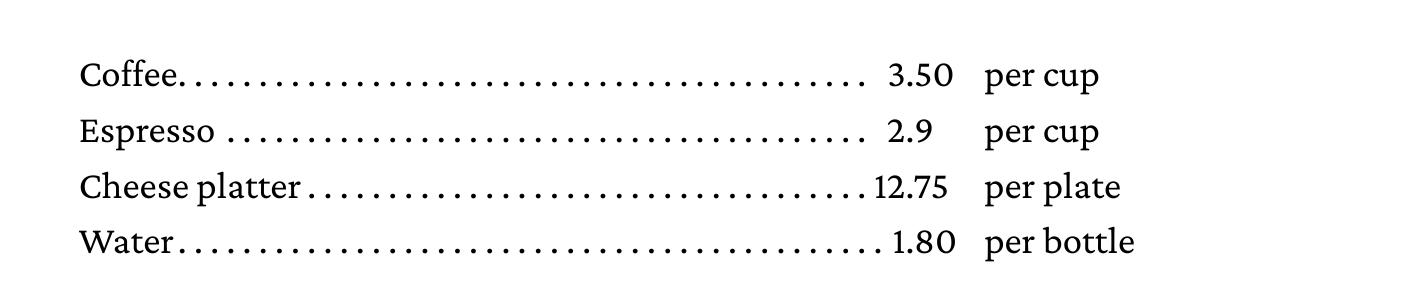
A decimal stop aligns the text after the tab on its first period, so prices with a different number of digits line up. For a decimal comma, write decimal(","); any string can be the separator. A text without the separator ends at the stop.
Defining stops
-bag-tab-stops takes none or a comma separated list of stops. Each stop has a position, optionally an alignment and optionally a leader:
| Part | Values |
|---|---|
| Position | A length (12mm, 3em) or a percentage of the line width (100%), measured from the start of the line |
| Alignment | start (the default), end, center, decimal, decimal(","). left and right mean start and end. |
| Leader | leader(dotted), leader(solid), leader(space) or a string such as leader(" - "), which fills the gap before the text |
The property is inherited, so stops set on body apply to every paragraph, and none switches inherited stops off. The CSS reference has the full syntax.
A tab moves to the first stop past the text before it. When the text before a tab already extends past the last stop, the tab gets the width of tab-size.
Tabs without stops
Without -bag-tab-stops, <Tab/> advances by tab-size, which is four spaces unless the stylesheet sets something else:
<StyleSheet>
  p { tab-size: 8mm; }
</StyleSheet>
<Tab/> and the tab character
A tab character in the text, such as <Value select="'	'"/> or a tab in the data, is whitespace like a space. Where tab stops are set, it stays a tab. Without stops, CSS collapses it to a space, unless white-space is pre or pre-wrap. <Tab/> always stays a tab, so it is the safer way to write one in a layout.
Inside <HTML> and in text copied with <CopyOf>, tab characters follow the same rules, as there is no <Tab/> in HTML.
Tabs after a line break
A tab right after <Br/> starts the new line at a stop, which indents a continuation line:
<Paragraph class="toc">
  <Value>4</Value><Tab/><Value>A long chapter title that</Value><Br/>
  <Tab/><Value>continues on the next line</Value><Tab/><Value>51</Value>
</Paragraph>