Flowing Text
<PlaceObject> puts one object on the page as a whole: a text block, an image, a table. That is what you want for a caption, a price box or a logo. Running text is different. An article, a contract or a report is longer than a page, and it should break between two lines, continue in the next column and go on on the next page. That is the job of <Flow>.
A flow takes a sequence of paragraphs, lists and tables and pours them into the frames of a positioning area, frame after frame and page after page, until everything is placed.
A first flow
<Layout xmlns="urn:speedata.de/2021/xts/en"
    xmlns:sd="urn:speedata.de/2021/xtsfunctions/en">

    <SetGrid width="5mm" height="12pt"/>
    <StyleSheet>
        p { margin-bottom: 4pt; }
        .heading { font-weight: bold; font-size: 14pt; break-after: avoid; }
    </StyleSheet>

    <Record match="article">
        <Flow>
            <Paragraph class="heading"><Value select="@title"/></Paragraph>
            <ForAll select="para">
                <Paragraph><Value select="."/></Paragraph>
            </ForAll>
        </Flow>
    </Record>
</Layout>
Without an area attribute the flow fills the whole page. With as many <para> elements as you like in the data, the text runs over as many pages as it needs. You do not need a <ClearPage> or a loop over pages: the flow starts new pages itself.
What goes into a flow
A flow takes the commands that produce blocks of text:
<Paragraph>and<HTML><Ul>and<Ol>with their<Li>items<Table>
and the commands that generate them from the data: <ForAll>, <Switch> and <CallTemplate>.
Everything inside a <Flow> is read first and laid out afterwards. This has two consequences:
- Commands that act on the page at once are an error inside a flow:
<PlaceObject>,<ClearPage>,<NextFrame>,<NextRow>and<Mark>. Breaks inside a flow are written in CSS instead, see Breaks. - A value such as
sd:current-page()inside a flow is the value when the flow starts, not on the page where the paragraph ends up.
A <TextBlock>, an <Image> or a <Box> cannot be part of a flow yet. XTS leaves such an object out and writes a warning to the protocol. Place it before or after the flow with <PlaceObject>.
Breaks
Inside a flow, XTS decides where a block breaks:
- Paragraphs break between lines.
orphansis the fewest lines a paragraph leaves at the foot of a frame,widowsthe fewest it carries to the top of the next; both are 2 by default, and1switches the rule off. A paragraph that cannot keep both, such as one of three lines with room for two, moves to the next frame whole. A paragraph inside a container, such as a list item or a<div>with a border, breaks as well, and the container is drawn in parts. - Tables break between rows. The rows of
<TableHead>are repeated at the top of every part, the rows of<TableFoot>at the bottom. A row itself never breaks, and the rows that arowspanjoins stay together. See Tables across pages. break-after: avoidkeeps a block with the next one, typically a heading with the first paragraph after it. A run of such blocks, a heading and a subheading, moves on together with the first lines of the block that follows. XTS sets no such rule by itself, so give it to the classes or HTML headings that you use as headings.break-inside: avoidkeeps a paragraph, a list or a container, such as a<div>inside<HTML>, in one frame. A block taller than a frame breaks all the same.
Forced breaks use break-before and break-after:
| Value | Effect in a flow |
|---|---|
column |
continue in the next frame of the area |
page |
continue on the next page |
left, verso |
continue on the next left (even) page |
right, recto |
continue on the next right (odd) page |
<StyleSheet>
    .chapter { break-before: right; font-size: 18pt; break-after: avoid; }
</StyleSheet>

<Flow>
    <ForAll select="chapter">
        <Paragraph class="chapter"><Value select="@title"/></Paragraph>
        <ForAll select="para">
            <Paragraph><Value select="."/></Paragraph>
        </ForAll>
    </ForAll>
</Flow>
A forced break also works on a block inside a container. On the first child of a container it applies to the container itself. A forced break wins over widows, orphans and avoid.
The top margin of the first block in a frame is dropped after an automatic break, so text that moves on starts at the top of the frame. After a forced break it is kept.
The typography chapter on boxesandglue.dev shows these rules with pictures, under Page breaks; they hold for a flow in XTS as well.
Flow and the grid
The grid is the backbone of an XTS page: objects snap to it, and every placed object allocates the cells it covers. A flow lives on the same grid, but its text does not snap to the rows. The rules are:
- The flow starts at the area’s cursor. That is the current row of the area, or the next row when the current row is already taken in part (the cursor is not in the first column).
<NextRow>before the flow moves the start down. - The flow fills only free rows. A row in which any cell of the frame is allocated is passed over. The flow fills runs of free rows, called bands, from top to bottom.
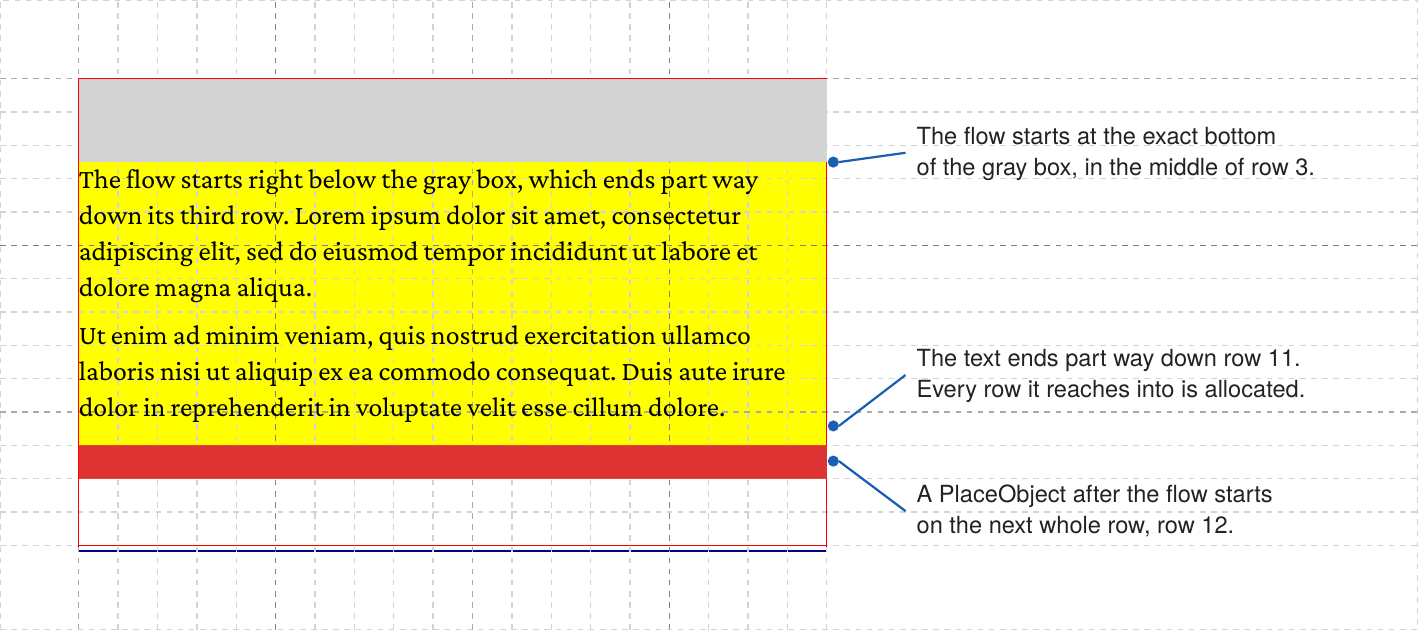
- A band starts at the exact bottom of the object above. If the object in the row above ends part way down its last row, the text starts right there, not at the next whole row. The gap between a picture and the text below it does not depend on the row height.
- The text is not rounded to the grid. Lines are set at the line height given by CSS. The rows the text reaches into are allocated, so the grid knows that they are taken.
- A
<PlaceObject>after the flow starts on the next whole row below the text.
The following image shows rules 3 to 5 with the grid allocation trace (<Trace grid="yes" gridallocation="yes"/>). The gray box is placed first, 30pt high on rows of 12pt. The flow starts at its exact bottom, and the red box after the flow starts on the next whole row:
PlaceObject after the flow.<PlaceObject>
<Box width="{sd:number-of-columns()}" height="30pt" background-color="lightgray"/>
</PlaceObject>
<Flow>
<ForAll select="para">
<Paragraph><Value select="."/></Paragraph>
</ForAll>
</Flow>
<PlaceObject>
<Box width="{sd:number-of-columns()}" height="1" background-color="red"/>
</PlaceObject>Objects in the way
Rule 2 means that a flow does not wrap around an object. An image in the middle of the area blocks the whole width of the frame for the rows it covers, also where it is narrow:
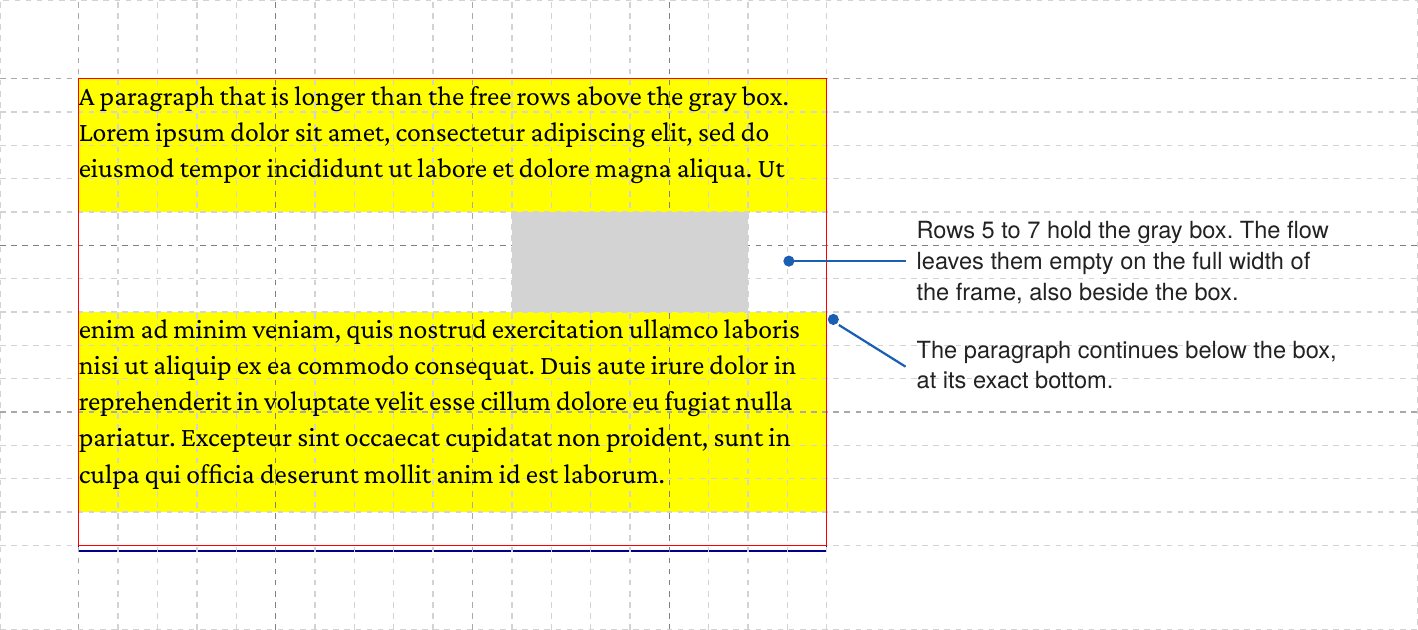
To put text beside a picture, divide the page into two areas, or place the picture in a frame of its own. An object placed with allocate="no" does not block any rows, so the text runs over it.
Several frames
When the area has more than one frame, the flow fills them in the order they are defined. After the last frame it starts a new page and continues in the first frame of the area of the same name. Every master page that the following pages can get must define that area, or the flow stops with an error.
Two frames side by side give a two-column layout. Each column starts at the exact bottom of what is above it:
<SetGrid width="5mm" height="12pt"/>
<DefineMasterPage name="page" test="true()" margin="10mm">
    <PositioningArea name="cols">
        <PositioningFrame column="1" row="1" width="15" height="{sd:number-of-rows()}"/>
        <PositioningFrame column="18" row="1" width="15" height="{sd:number-of-rows()}"/>
    </PositioningArea>
</DefineMasterPage>

<Record match="data">
    <Flow>
        <Paragraph class="intro"><Value select="intro"/></Paragraph>
    </Flow>
    <Flow area="cols">
        <ForAll select="para">
            <Paragraph><Value select="."/></Paragraph>
        </ForAll>
    </Flow>
</Record>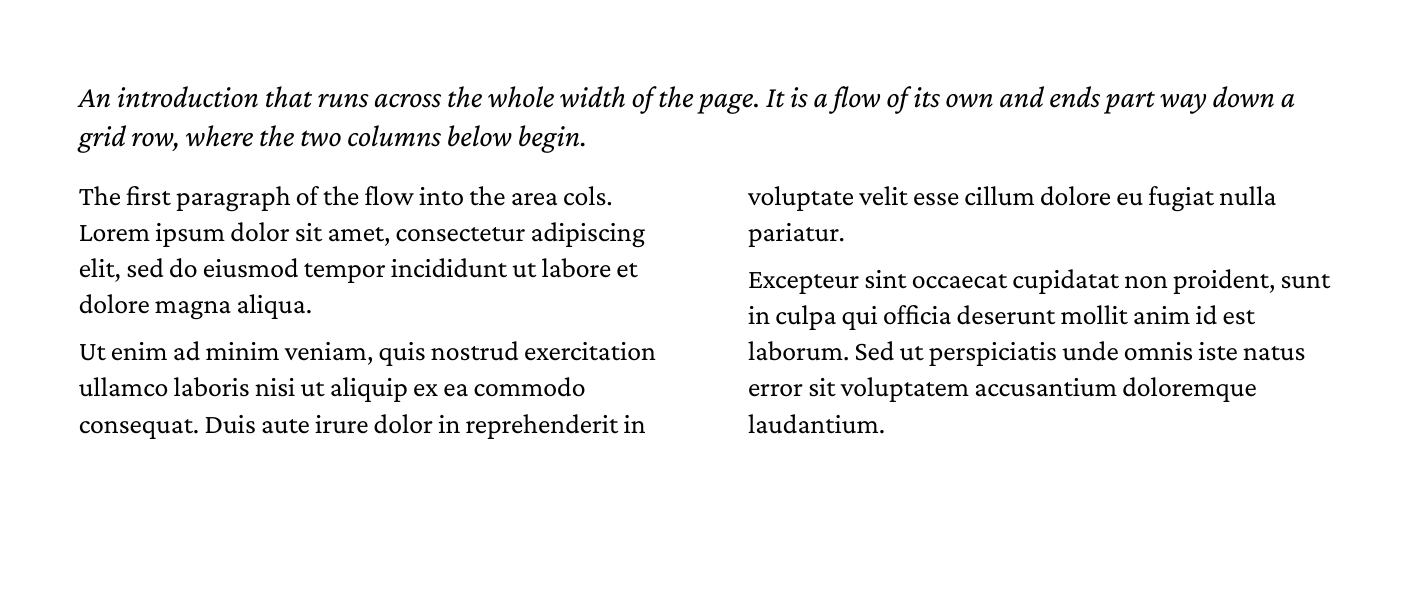
cols starts at its exact end in both columns. The second paragraph breaks between the columns: two lines go to the right column, as widows: 2 asks.Balanced columns
A flow fills a frame before it goes on to the next one, which is what running text needs. When a short run of columns ends part way down the page, with more content across the page below it, that leaves one long column and an empty one. With column-fill="balance", named after the CSS property, the flow spreads its end over the frames of its last page instead, so that they end at about the same height:
<Flow area="cols" column-fill="balance">
    <ForAll select="para">
        <Paragraph><Value select="."/></Paragraph>
    </ForAll>
</Flow>
<Flow>
    <Paragraph class="intro"><Value select="outro"/></Paragraph>
</Flow>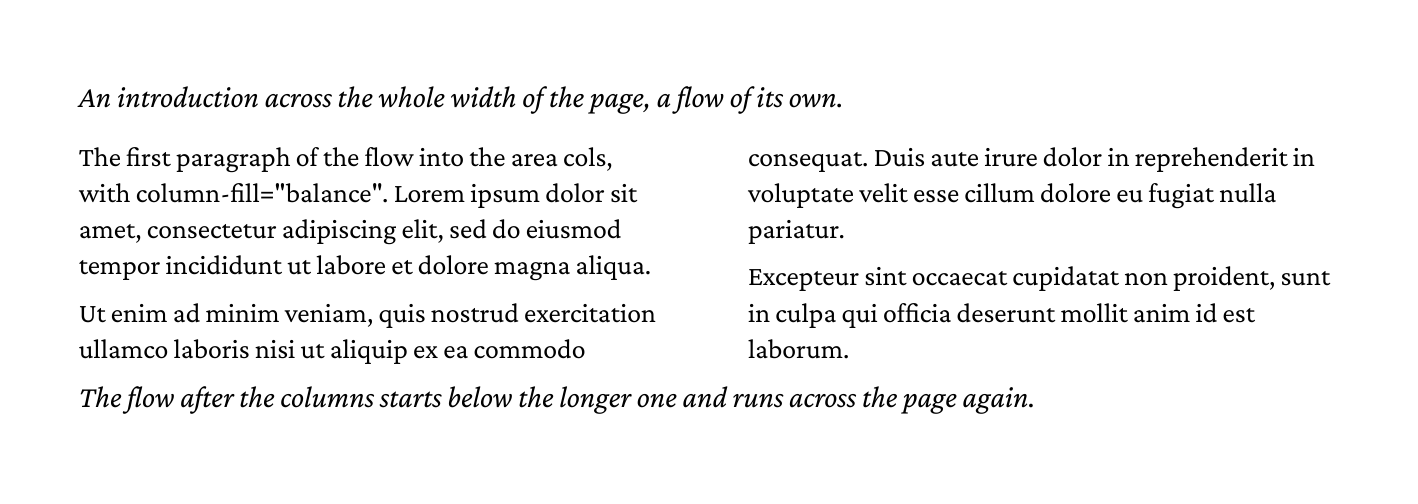
cols are spread over both columns. The flow after it starts below the longer one.Only the last page is balanced. The pages before it fill their frames one after the other, as without the attribute, and so does a part of the flow that a forced break such as break-before: page ends. xts tries heights until it finds the highest line across the page at which the rest of the flow still ends on that page, with widows, orphans and the breaks as they are. Each frame then ends at that line, or at its own foot above it; a band that starts below the line stays empty. bottom and a flow that follows directly start below the longest frame.
Each try sets the end of the flow again, from its last forced break on. For a long flow without forced breaks, that takes a few times as long as filling the frames. When a block on the last page moves into a frame of another width, the page is filled as without balancing. In a <Slate>, the attribute has no effect.
One flow after another
A <Flow> that follows another directly continues exactly where the first one ended. The margin below the last block collapses with the margin above the next block as if both were one flow. Commands that do not touch the page, such as <SetVariable> or <Message>, may stand in between; a <PlaceObject>, <NextRow> or <NextFrame> ends the connection, and the next flow starts anew at the cursor. So you can split long text into several flows, for example to compute a value in between, without a visible seam:
<Flow>
    <ForAll select="section[1]/para">
        <Paragraph><Value select="."/></Paragraph>
    </ForAll>
</Flow>
<SetVariable variable="count" select="count(section[2]/para)"/>
<Flow>
    <Paragraph><Value select="concat($count, ' more paragraphs:')"/></Paragraph>
    <ForAll select="section[2]/para">
        <Paragraph><Value select="."/></Paragraph>
    </ForAll>
</Flow>
When the next flow goes into an area with several frames, as in the two-column example above, every frame that is free from there starts at that height.
Where did the flow end?
The attribute bottom names a variable that is set to where the flow ended, as a number in points below the top of the page’s grid. With frames side by side it is the bottom of the longest one on the last page.
This example draws a box behind the text that is exactly as tall as the text. The box is placed after the flow with layer="behind", so it lies under the text, and with allocate="no", so it does not take any cells:
<Flow bottom="textend">
    <ForAll select="para">
        <Paragraph><Value select="."/></Paragraph>
    </ForAll>
</Flow>
<PlaceObject row="1" column="1" allocate="no" layer="behind">
    <Box width="{sd:number-of-columns()}" height="{$textend}pt" background-color="lightyellow"/>
</PlaceObject>
To place an object at an absolute position below the text, add the top margin of the page: absolute positions count from the edge of the page, bottom counts from the top of the grid.
Finding the parts
A paragraph or table that breaks across frames and pages keeps its id in every part. With --dumpoutput every part shows up with its page and position, which makes it easy to check in a test where a block ended up:
<Paragraph id="intro"><Value select="intro"/></Paragraph>xts --dumpoutput dump.xmlSee Quality Assurance for comparing whole documents.
PlaceObject, TextBlock or Flow?
| You want to… | Use |
|---|---|
| place a heading, a caption, a label or a price box as one piece | <PlaceObject> with a <TextBlock> |
| place a table that must stay in one piece | <PlaceObject> with a <Table> |
| set running text over several frames or pages | <Flow> |
| let a long table break between rows, with repeated header | <Flow> with a <Table> |
| put content on top of the page or in a fixed position | <PlaceObject> with row and column |
A table placed with <PlaceObject> that is taller than every frame of its area is an error that points to <Flow>.
Limits
- Text does not flow around objects; a row with an object is passed over as a whole.
- A flow is not possible inside another flow. Inside a
<Slate>it does not break: it stacks its blocks as one object (see Slates). <TextBlock>,<Image>and<Box>are left out of a flow with a warning.- A
<Mark>cannot be set inside a flow, sosd:page-number()does not find a paragraph placed by a flow.
What’s next?
The core concepts are complete. Continue with Text & Styling to load fonts and format the text inside your flows, or read Multi-Page Content for page breaks and frames.