Master Pages
A master page defines the blueprint for a page: its margins, grid, and positioning areas. XTS picks the right master page for each new page based on a test condition.
Defining a master page
<DefineMasterPage name="default" test="true()" margin="1cm"/>This creates a master page called “default” that matches all pages (the test is always true) with 1cm margins on all sides.
Conditional master pages
You can have different layouts for different pages:
<!-- Fallback for all pages -->
<DefineMasterPage name="default" test="true()" margin="1cm"/>

<!-- Even pages: wider left margin for binding -->
<DefineMasterPage name="even" test="sd:even(sd:current-page())" margin="1cm 1cm 1cm 2cm"/>

<!-- First page: extra top margin for a header -->
<DefineMasterPage name="first" test="sd:current-page() = 1" margin="3cm 1cm 1cm 1cm"/>
XTS evaluates the tests in reverse order of definition: the master page defined last whose test matches wins. Put the catch-all true() first and your most specific conditions last. The four margin values follow the CSS order top, right, bottom, left.
Master pages with areas
Combine master pages with positioning areas for complex layouts:
<SetGrid nx="12" ny="20"/>

<DefineMasterPage name="twoColumn" test="true()" margin="1.5cm">
    <PositioningArea name="header">
        <PositioningFrame width="12" height="2" row="1" column="1"/>
    </PositioningArea>
    <PositioningArea name="left">
        <PositioningFrame width="5" height="16" row="4" column="1"/>
    </PositioningArea>
    <PositioningArea name="right">
        <PositioningFrame width="5" height="16" row="4" column="7"/>
    </PositioningArea>
</DefineMasterPage>
Page setup from CSS
The margins of a master page can also come from a CSS @page rule in a StyleSheet. The rule @page name { ... } belongs to the master page with the same name; the generic @page { ... } rule is the base for every master page. This is the place for static headers and footers, too: the page margin boxes @top-left, @top-center, @top-right, @bottom-left, @bottom-center and @bottom-right are placed in the page margin, outside the grid.
<StyleSheet>
    @page default {
        margin: 2cm;
        @top-left { content: "NORDWERK"; font-weight: bold; vertical-align: bottom; }
        @bottom-right { content: "Page " counter(page); font-size: 9pt; }
    }
</StyleSheet>
<DefineMasterPage name="default" test="true()" />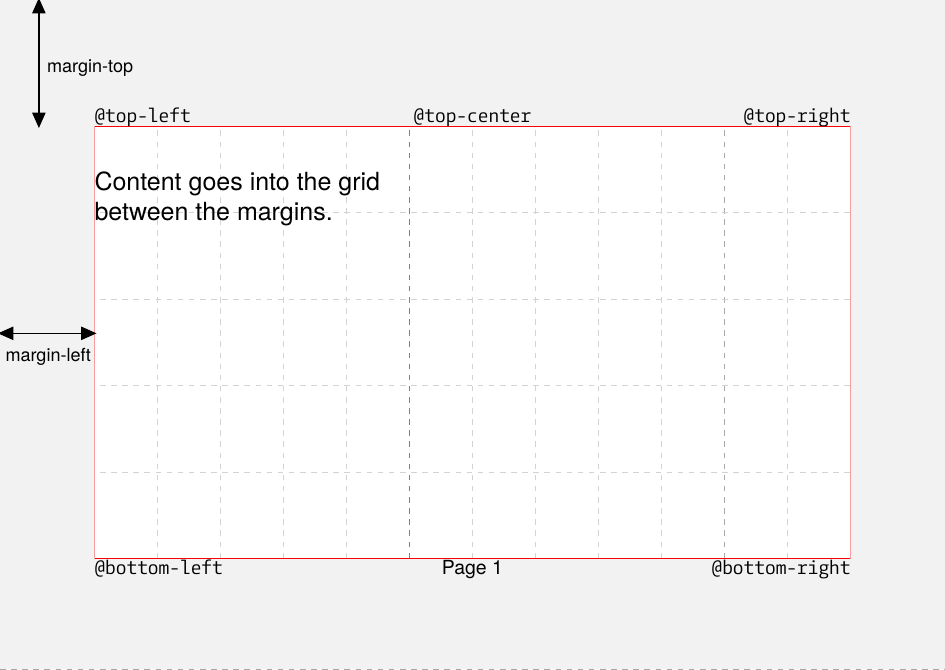
The rules for combining both mechanisms:
- The
marginattribute of<DefineMasterPage>stays authoritative for the page geometry, because it defines the grid. Without the attribute the margins come from the@pagerule, and without either they are 1cm. If both are given and differ, the attribute wins and XTS issues a warning. - The margin boxes are rendered when the page is written to the PDF, like
<AtPageShipout>, socounter(page)is the final page number. - Their content is limited to text,
counter(page)and an image viaurl(). Tables, several paragraphs or values from the data still need a page hook. - The CSS page selectors
:first,:leftand:rightare not evaluated. Thetestattribute selects the master page.
Page format
Set the page size with <PageFormat>:
<PageFormat width="210mm" height="297mm"/>  <!-- A4 -->
<PageFormat width="8.5in" height="11in"/>   <!-- US Letter -->
<PageFormat width="15cm" height="20cm"/>    <!-- Custom -->
The default is A4 (210mm x 297mm).