Using Fonts
XTS supports TrueType (.ttf), OpenType (.otf) and TrueType/OpenType collections (.ttc) fonts. Loading them is done through CSS @font-face rules – the same syntax you’d use on the web.
Loading font families
A font family groups the regular, bold, italic, and bold-italic variants under one name. Define them in a <StyleSheet> block:
<StyleSheet>
  @font-face {
      font-family: "Minion Pro";
      src: url("MinionPro-Regular.otf");
  }
  @font-face {
      font-family: "Minion Pro";
      src: url("MinionPro-Bold.otf");
      font-weight: bold;
  }
  @font-face {
      font-family: "Minion Pro";
      src: url("MinionPro-It.otf");
      font-style: italic;
  }
  @font-face {
      font-family: "Minion Pro";
      src: url("MinionPro-BoldIt.otf");
      font-weight: bold;
      font-style: italic;
  }
</StyleSheet>
You only need to define the variants you actually use. If you never use bold italic, skip it.
When the text asks for a variant the family does not have, XTS uses the closest one it has. A missing weight falls back to the nearest defined weight without a message. A missing italic uses the upright face and writes a warning to the protocol, once per family and style. With font-synthesis-style: auto the upright is slanted by 12° instead, as browsers and word processors do:
<StyleSheet>
  body {
      font-synthesis-style: auto;
  }
</StyleSheet>
@font-face also takes size-adjust, which scales a face so that it matches the size of its neighbors, and ascent-override, descent-override and line-gap-override. The overrides are only read by a line model registered from Go (see Running XTS from Go). The CSS reference lists all descriptors.
Selecting fonts
Once loaded, use the font family name in your CSS rules:
<StyleSheet>
  body {
    font-family: serif;
  }
  .preface {
    font-family: sans;
  }
</StyleSheet>

<Paragraph>
    <Span class="preface"><Value>Preface</Value></Span>
    <Value> more text</Value>
</Paragraph>
Font size and line height
The size of the text and the distance between lines are CSS properties, not part of the font definition:
<StyleSheet>
  p {
    font-size: 11pt;
    line-height: 14pt;
  }
</StyleSheet>
font-size is the height of the em box of the font. line-height is the distance from one baseline to the next. A unitless value such as line-height: 1.3 is a factor of the font size and follows the font size when it changes, so it is the better choice for inherited settings. The default is a font size of 10pt with a line height of 1.2, which gives 12pt from baseline to baseline.
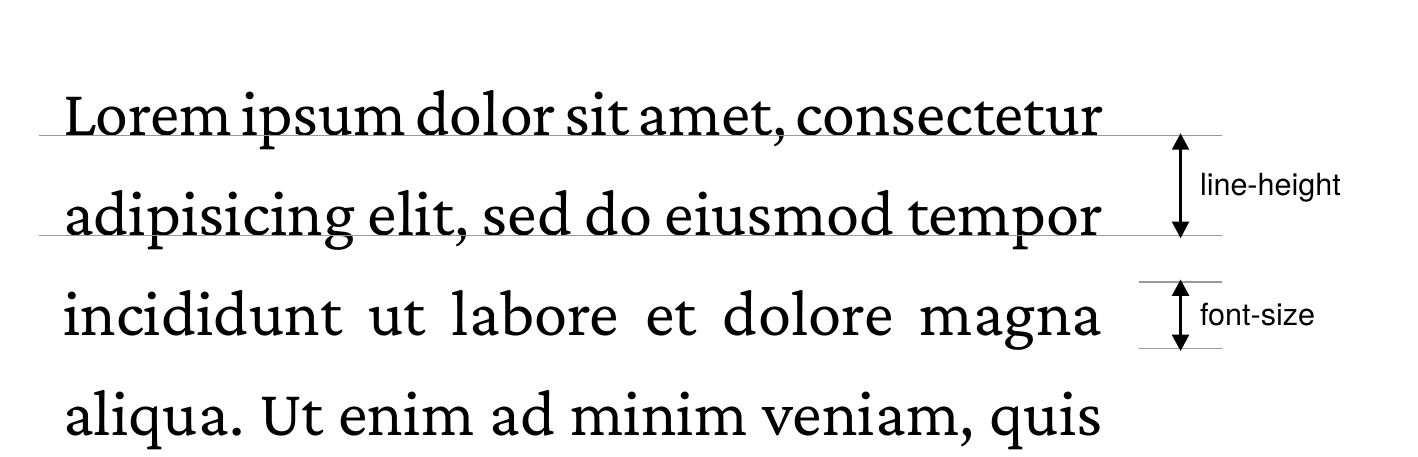
XTS follows the CSS model of line spacing: the space between the line height and the height of the glyphs is split into two halves, one above and one below each line. This is what browsers do and it matters when a line mixes several font sizes or when the first line of a block is placed.
Default fonts
XTS ships with three built-in font families that you can use without loading anything:
| Name | Font | Style |
|---|---|---|
sans |
TeXGyreHeros | Helvetica clone |
serif |
CrimsonPro | Elegant book font |
monospace |
CamingoCode | Coding font |
If you don’t specify a font, XTS uses serif (set in the CSS defaults as the html element’s font-family).
Where to put font files
Font files follow the same rules as all other resources in XTS – see File Organization. In short:
- Put them in the project directory (or a subdirectory)
- Or use
--extradirto add a shared font directory - Or use
--systemfontsto access system-installed fonts
OpenType features
OpenType fonts often include optional features like old-style figures, small caps, or fraction rendering. Control them with font-feature-settings:
<StyleSheet>
    .regular {
        font-feature-settings: "lnum", "tnum";
    }
    .oldstyle {
        font-feature-settings: "onum";
    }
</StyleSheet>

<Record match="data">
    <PlaceObject>
        <TextBlock>
            <Paragraph class="regular">
                <Value>Tabular figures: 1234567890</Value>
            </Paragraph>
            <Paragraph class="oldstyle">
                <Value>Old-style figures: 1234567890</Value>
            </Paragraph>
        </TextBlock>
    </PlaceObject>
</Record>
A feature only has an effect when the font has it. The built-in serif font has old-style figures, but no small caps, so font-feature-settings: "smcp" leaves its text unchanged.
Small caps
For small caps, use font-variant-caps instead of the feature tag:
<StyleSheet>
    .sc {
        font-variant-caps: small-caps;
    }
</StyleSheet>
XTS uses the small caps of the font (smcp) when it has them. Otherwise it synthesizes them: every letter that changes when uppercased becomes its capital at 70% of the size, with the case rules of the language, so ß becomes SS. font-synthesis-small-caps: none switches the synthesis off, and the font shorthand accepts small-caps as well.

font-variant-caps: small-caps in the built-in serif font, which has no small caps of its own, so they are synthesized.Synthesized small caps are capitals in the PDF, so a search or a copy of the text sees SEBASTIAN instead of Sebastian. Small caps from the font keep the original text.
Other features
You can also set features inline:
<Paragraph style="font-feature-settings: 'frac';">
    <Value>Use 1/4 cup of milk.</Value>
</Paragraph>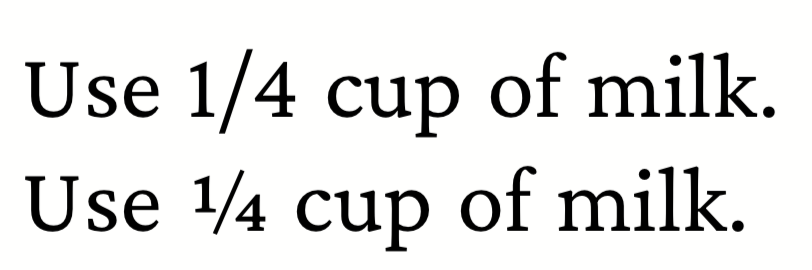
frac feature turns "1/4" into a proper fraction glyph.The full list of OpenType feature tags is in the OpenType spec. XTS enables the same default features as HarfBuzz, including liga.